

What Is Agentforce 360?


Table of Contents


Introduction
Your Salesforce org already holds everything it needs to work smarter. The customer history, the open cases, the pipeline data, the service records — it is all there.
The problem is not information. It is action. Someone still has to read the data, decide what to do, and then do it. At scale, that gap between data and action costs businesses time, accuracy, and money every single day.
Agentforce 360 is Salesforce's answer to that gap. It is the platform that turns your Salesforce data into a foundation for AI agents that act — not just suggest.
This blog explains what Agentforce 360 is, how it works under the hood, what agents actually do across Sales, Service, IT, and HR, and what your business needs to know before implementing it.
What Is Agentforce 360?
Agentforce 360 is Salesforce's unified AI agent platform. It lets you build, deploy, and manage AI agents that work directly inside your Salesforce environment — reading your CRM data, making decisions, and taking action on behalf of your teams.
The key distinction from earlier Salesforce AI: Einstein features gave your team suggestions. Agentforce 360 agents do the work.
An agent does not surface a recommendation and wait for a human to act on it. It reads the situation, builds a plan, executes the right steps, logs the outcome, and hands off to a human only when genuine judgment is needed.
The Agentforce 360 generation introduced four capabilities that define what the platform is today:
- Agentforce Builder : a conversational workspace where admins and business analysts design agents in plain language, with no code required for most use cases
- Agent Script : a structured scripting layer for teams that need precise, deterministic control over what an agent does and when
- Agentforce Voice : extends agent intelligence into spoken conversation, for phone-based service and frontline teams
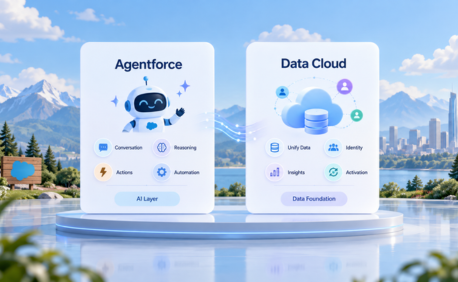
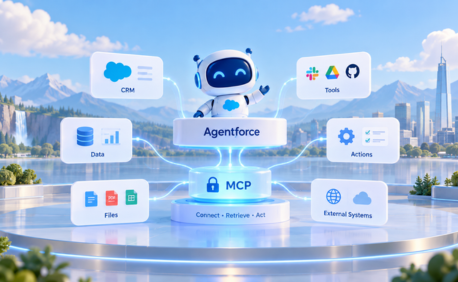
- Intelligent Context : grounding every agent response in your actual CRM data through Data 360 and the Model Context Protocol (MCP)
Agentforce 360 Platform: How It Works in Salesforce
Every Agentforce 360 agent runs on the Atlas Reasoning Engine — Salesforce's proprietary AI reasoning layer that sits underneath every agent action.
Understanding Atlas is the key to understanding why Agentforce 360 is different from a chatbot or a rules-based automation.
Atlas Does Not Follow a Script - It Builds a Plan
A traditional chatbot follows a fixed decision tree. Ask it something it does not expect and it breaks. Atlas works differently.
When a request comes in, Atlas runs a reason → act → observe loop:
- Reason : Atlas reads the request, pulls relevant data from your Salesforce org, and builds a step-by-step plan for how to handle it
- Act : It executes the first step using the appropriate tool: a Salesforce Flow, an Apex action, an API call, or a Prompt Template
- Observe : It checks whether the outcome matches the goal. If it does not, it adjusts the plan and tries the next approach
- Loop : It repeats until the task is complete or determines a human needs to take over
This is what Salesforce calls inference-time reasoning, the agent thinks through the problem fresh each time, rather than matching it to a pre-written script.
A Real Example: A Customer Reports a Delayed Order
Here is Atlas in action on a single service request.
The customer writes: "My order was supposed to arrive Friday. It hasn't shown up."
- Atlas reads the situation : It pulls the customer's account, the specific order, and the current shipping status from live Salesforce data
- It builds a plan : It determines two things are needed: confirm the delay, and check if Friday is still achievable given carrier status
- It takes action : Using a pre-built Flow connected to the shipping API, it retrieves live tracking data and finds the package is delayed by two days
- It checks the result : The delay is confirmed. Friday is not achievable
- It responds and logs : It drafts a message acknowledging the delay with the new expected date, logs the interaction in Service Cloud, and offers a discount code per the escalation policy your team configured
- It hands off if needed : If the customer replies with a complaint that requires judgement, the agent escalates with the full case context already attached
Your service agent never touched this ticket. And when they do step in, they have the full picture waiting for them.
Topics, Instructions, and Actions: How You Build an Agent
Every Agentforce 360 agent is built from three components. Understanding these is essential before you start building.
Topics
A Topic defines what an agent is responsible for. It is the scope of the agent's job. Examples:
- Order status enquiries
- Lead qualification
- IT incident triage
- HR leave policy questions
Each Topic maps to a set of Instructions and a library of Actions the agent can take. When a request comes in, Atlas classifies it into the right Topic — which narrows the reasoning problem and enforces your business rules from the start.
Instructions
Instructions tell the agent how to handle a Topic. They are written in plain language and define:
- What data to check first
- What rules apply (e.g. "only offer a refund if the order is more than 3 days late")
- When to escalate to a human
- What tone and format to use in responses
Actions
Actions are the tools an agent uses to get the job done. They connect the agent to real functionality inside and outside Salesforce:
- Salesforce Flows : for standard CRM automation
- Apex code : for custom business logic
- Prompt Templates : for AI-generated responses grounded in your data
- External APIs : for third-party systems like shipping carriers, ERPs, or HR platforms
- MCP-connected tools : for any external service connected via Salesforce's Model Context Protocol
Your agent can only use the Actions you configure. This is a governance feature, not a limitation — it means your agent stays within the boundaries your business sets.
What Makes Salesforce Agentforce 360 Different from Earlier Salesforce AI
What Salesforce Agentforce 360 Agents Do Across Your Business
Sales Teams
Sales agents do not replace your reps. They handle the work that gets in the way of selling.
- Monitor the pipeline and surface deals that need attention before they go cold
- Draft follow-up emails based on the last interaction logged in Salesforce
- Update opportunity stages and call notes after every conversation
- Qualify inbound leads against your ICP criteria and route them to the right rep
- Flag stalled deals and suggest the next best action based on similar won opportunities
The result: your reps spend more time in conversations and less time in the CRM.
Service Teams
Service agents handle the volume so your human agents can focus on the cases that matter.
- Resolve tier-one queries by pulling from your knowledge base and case history
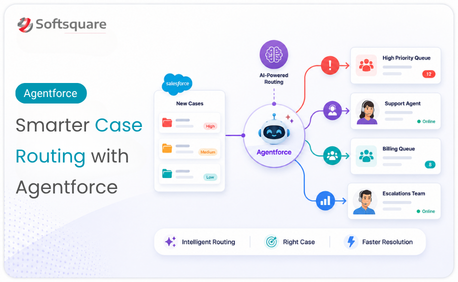
- Classify incoming cases and route them to the right team or specialist automatically
- Escalate complex issues with full context already attached, no handoff friction
- Send proactive updates to customers when case status changes
- Log every interaction in Service Cloud without your agent doing it manually
IT Teams
IT agents turn reactive support into proactive operations.
- Analyse patterns across system logs and past tickets to identify the likely root cause of an incident
- Trigger remediation flows for known issues without waiting for a human to triage
- Deflect repetitive tier-one tickets (password resets, access requests, VPN issues) automatically
- Surface real-time system health summaries when your IT team needs them
HR Teams
HR agents give employees answers around the clock without adding to your HR team's workload.
- Answer policy questions on leave, expenses, benefits, and onboarding steps
- Guide new employees through their onboarding checklist
- Handle routine requests like updating personal information or submitting leave
- Escalate to an HR business partner only when the request genuinely needs a human
The Role of Data 360: Why Your Data Foundation Matters
An agent is only as good as the data it works with. This is the most important thing to understand before you start building.
Agentforce 360 agents pull live data from your Salesforce org through Data 360, the unified data layer that connects your CRM records, documents, emails, and analytics into one governed foundation. When a request comes in, the Atlas Reasoning Engine retrieves the relevant data in real time using RAG (Retrieval-Augmented Generation), ensuring the agent's response is grounded in your actual records not the AI model's general training data.
What this means practically:
- If your CRM data has duplicates, incomplete records, or inconsistent formats your agents will produce unreliable outputs
- If your customer records are clean, complete, and well-structured your agents will respond with precision and accuracy
- The businesses that see the fastest value from Agentforce 360 are the ones that complete a data quality audit before they start building agents
Data 360 is not optional infrastructure. It is the foundation every agent stands on.
→ Deep dive: Salesforce Data 360?
The Einstein Trust Layer: How Agentforce Stays Secure
Enterprise AI adoption stalls when security and compliance teams cannot see what the AI is doing. Agentforce 360 addresses this through the Einstein Trust Layer , Salesforce's built-in security framework for every agent action.
The Einstein Trust Layer does four things:
- Masks sensitive data before it ever reaches the underlying AI model : PII, financial data, and health records are protected automatically
- Logs every agent action for audit purposes : you can see exactly what decision the agent made, what data it accessed, and what action it took
- Respects your existing Salesforce permissions : agents can only access the data and perform the actions that your configured permission sets allow
- Applies prompt injection defences : protecting against attempts to manipulate agent behaviour through malicious inputs
For businesses in regulated industries financial services, healthcare, public sector the Einstein Trust Layer is what makes Agentforce 360 deployable in production environments.
How to Implement Agentforce 360: Where to Start
The businesses that struggle with Agentforce 360 are the ones that try to do everything at once. The ones that succeed start small, prove value fast, and expand.
Step 1: Audit Your Data Quality
Before you build a single agent, assess the state of your Salesforce data. Identify duplicates, incomplete records, and fields that agents will rely on. Fix the foundation before you build on it.
Step 2: Choose One Use Case
Pick the highest-volume, most repetitive task in one team that follows a predictable pattern. Good first candidates: service case routing, lead qualification, HR policy queries, IT password resets. Avoid starting with a use case that requires complex judgment.
Step 3: Define Topics, Instructions, and Actions
Map out exactly what your first agent needs to do, what data it needs to access, and when it should hand off to a human. Write this out in plain language before you open the Agent Builder.
Step 4: Build and Test in a Sandbox
Use Agentforce Builder to create the agent in your sandbox org. Test it against real scenarios with real data. Check every edge case before moving to production.
Step 5: Deploy with Monitoring
Go live in production with Agentforce Command Center switched on, Salesforce's real-time dashboard for tracking agent sessions, resolution rates, escalation patterns, and latency. Your first few weeks in production are your most important learning period.
Step 6: Expand by Department
Once your first agent is stable and delivering measurable results, identify the next use case. Scale department by department rather than rebuilding everything at once.
Why Softsquare for Agentforce 360
Softsquare is a Salesforce Summit Partner with 30+ certified Agentforce specialists and 60+ Data Cloud experts. We have been working with Agentforce since its first release and have built and deployed agents across Sales Cloud, Service Cloud, and industry clouds for clients in financial services, healthcare, manufacturing, and consumer goods.
We also build our own Agentforce-powered products. FileMate, our AI assistant for Salesforce files — uses Agentforce 360 to extract information from documents, generate summaries, and answer questions about files stored in your org. It is a live, production example of what a well-designed Agentforce agent looks like in practice.
What we deliver:
- Agentforce readiness assessment : data quality audit, use case prioritisation, and org review before any build begins
- Agent design and scoping : Topics, Instructions, and Actions mapped to your specific business processes
- Agentforce 360 implementation : building and deploying agents for Sales, Service, IT, HR, and your industry cloud
- Data 360 foundation work : ensuring your data layer supports reliable agent outputs from day one
- Training, change management, and managed services : making sure your team understands how to work alongside agents
Conclusion
Agentforce 360 is not a feature you switch on. It is a platform you build on and what you build determines whether your agents deliver real business value or sit unused after launch.
The businesses getting results are the ones that start with clean data, a clear first use case, and a partner who has deployed this before. The architecture — Atlas Reasoning Engine, Topics, Instructions, Actions, Data 360, Einstein Trust Layer is Salesforce's most mature and capable AI platform to date.
If you want to understand what Agentforce 360 could do in your specific org, we are ready to show you.
Ready to Transform with AI?
Frequently Asked Questions
Agentforce 360 is Salesforce's AI agent platform for building, deploying, and managing agents that can reason over data and take actions in business workflows.
Traditional chatbots follow fixed paths, while Agentforce 360 uses reasoning to interpret requests, plan steps, take actions, and adjust based on results.
The Atlas Reasoning Engine is the decision-making layer that helps Agentforce interpret a request, build a plan, execute actions, and evaluate outcomes.
Topics define scope, Instructions explain how the agent should behave, and Actions give it the tools needed to complete approved tasks.
Many use cases can be configured with Agentforce Builder, while advanced integrations or custom actions may require Apex or developer support.
Agents can use CRM records, knowledge, Data 360 context, flows, prompt templates, and approved integrations to ground responses and actions.
Agentforce operates within configured Salesforce permissions, action guardrails, and Einstein Trust Layer controls for governed data access and execution.
More Insights for you








Ready to Transform Your Business with Salesforce & AI?
