

How Banking Teams Get a Complete Customer View Faster With Agentforce


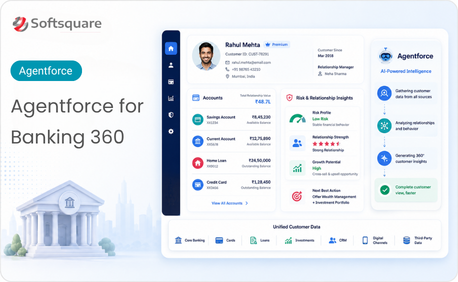
Table of Contents


Banking teams need the right customer context before every important conversation. Whether a customer is applying for a loan, discussing a financial goal, following up on a service issue, or exploring a new product, the team needs a clear view of the customer's relationship with the bank.
The challenge is that this information often sits across different Salesforce records. Existing loans, open cases, income details, salary information, transaction history, referrals, and relationship data may all be available but not always easy to review together.
That is where Agentforce for banking can make a practical difference. With the right setup, Agentforce can help banking teams retrieve relevant Salesforce data, summarize it in plain language, and present a complete customer view faster so teams can focus on understanding the customer and making better decisions.
Why Customer Data Review Takes Too Long in Banking
For many banking teams, customer data review is still a manual process. A relationship manager or banking associate may need to open multiple Salesforce records, review related lists, check service cases, look at loan details, and compare income or transaction information before forming a complete picture.
This slows down the customer experience because the team is spending valuable time gathering information instead of acting on it.
- Customer information spread across multiple Salesforce records
- Time spent switching between tabs and related lists
- Manual effort required to connect loans, cases, income, and transactions
- Risk of missing important service or financial context
- Slower preparation for customer meetings and account reviews
The issue is not that the data is unavailable. In most cases, the data already exists in Salesforce. The real challenge is making that data easy to access, understand, and use at the right moment.
What Is an Account Insights Agent
An Account Insights Agent is an Agentforce-powered assistant that helps banking teams generate a customer summary from Salesforce data. Instead of asking users to manually review every related record, the agent can retrieve relevant information and produce a readable summary that supports account reviews, loan discussions, service follow-ups, and relationship management.
The summary can include details such as:
- Existing loan information
- Open service cases
- Income and salary details
- Recent transactions
- Relationship history
- Customer goals
- Risk or follow-up signals
- Product or service readiness indicators
The goal is not to replace the banker’s judgment. The goal is to reduce the time spent collecting information so teams can make decisions with better context.
How Banking Teams Use Agentforce for Faster Account Insights
Agentforce can support the banking account review process by turning scattered Salesforce data into a structured, readable customer summary.
Customer Data Retrieval: The agent can retrieve relevant customer details from Salesforce records based on the account in context. This can include loan records, cases, income information, salary details, transaction data, and relationship records reducing the need for users to manually search through multiple objects or related lists.
Plain-Language Summary: Once the data is retrieved, the agent presents the information in a simple summary. Instead of showing raw data alone, it helps users understand what matters most for the current review highlighting active loans, open service issues, income stability, recent transaction activity, or relationship depth.
In-Context Salesforce Experience: The summary can be made available within the Salesforce workflow where the banking team already works. This helps users access account insights without moving to separate tools or exporting data.
Faster Decision Support: By bringing the right customer context together, the agent helps banking teams prepare faster for meetings, lending conversations, service reviews, and relationship discussions with fewer missed details.
Our Solution: Account Insights Agent for Banking Teams
Softsquare helps banking and financial services teams design and implement an Agentforce-powered Account Insights Agent within Salesforce. The solution is built around the client's actual banking process, not as a generic AI layer.
- Retrieve customer data from relevant Salesforce records
- Generate Account 360-style summaries in plain language
- Include loans, cases, income, salary, transactions, and relationship data
- Support loan review, service follow-up, and customer meeting preparation
- Customize summary formats based on user role or business process
- Keep the experience aligned with Salesforce workflows and access controls
This makes Agentforce for banking customer insights more practical for everyday banking operations. Instead of giving teams another tool to manage, the solution helps them use the Salesforce data they already have more effectively.
What Banking Teams Can See in the Account Summary
A complete customer summary should help the user understand the customer quickly without reading every individual record.
Current Challenge vs. How the Solution Helps
This makes the account review process more consistent, especially when different users need to understand the same customer from different perspectives.
Practical Use Cases for Agentforce in Banking
Loan Review Preparation: A relationship manager is preparing for a new loan discussion. Before meeting the customer, they need to understand existing loans, income details, repayment context, recent transactions, and open service issues. With an Account Insights Agent, the manager can generate a quick summary instead of manually reviewing each record. Business value: Faster preparation with stronger customer context.
Customer Meeting Readiness: A banker has a scheduled meeting with an existing customer and needs a complete view of the relationship. The agent summarizes key account details, service history, financial activity, and relationship signals helping the banker personalize the conversation and avoid asking for information the bank already has. Business value: Better meeting preparation and stronger customer engagement.
Service Follow-Up Review: A customer may have unresolved service cases or recent support interactions before a banking conversation. The agent surfaces open cases and recent interactions as part of the summary. Business value: Avoids disconnected conversations and improves the overall customer experience.
Relationship Growth Opportunity: A banking team wants to identify whether a customer may be ready for additional products or advisory support. The agent summarizes relationship depth, transaction patterns, financial goals, and existing products. Business value: Stronger starting point for relevant recommendations.
Business Value for Banking Teams
Agentforce for banking can help teams improve the speed and quality of customer-facing work.
Key business benefits include:
- Reduced Preparation Time: Teams spend less time opening records and more time reviewing useful insights.
- Better Customer Conversations: Bankers can enter meetings with a clearer understanding of the customer’s full relationship.
- Fewer Missed Details: Important signals such as open cases, existing loans, or recent transaction activity are easier to surface.
- Improved Decision Quality: Teams can make decisions using broader customer context instead of partial information.
- Higher Productivity: Relationship managers and service teams can complete account reviews faster.
- Better Use of Salesforce Data: The data already available in Salesforce becomes more accessible and actionable.
Key Benefits of Agentforce Customer Insights
- For Banking Users: Banking users can prepare faster, understand customers better, and reduce the time spent collecting information manually. This helps them focus on conversations, decisions, and follow-ups.
- For Internal Teams: Service, relationship, and lending teams can work from a more consistent customer view. This reduces gaps between departments and improves collaboration around the same customer.
- For Business Leaders: Business leaders benefit from faster customer handling, improved team productivity, and better use of Salesforce data. When teams can access customer insights faster, the organization can improve responsiveness without adding unnecessary manual effort.
Why Choose Softsquare for Agentforce for Banking
Softsquare helps businesses design Salesforce and Agentforce solutions around real operational needs. For banking and financial services teams, we look at the customer journey, Salesforce data model, user roles, business process, and reporting needs before designing the solution.
- Agentforce solution planning
- Prompt Builder configuration
- Salesforce data retrieval design
- Account summary structure
- Role-based output planning
- Salesforce workflow alignment
- Testing with real account scenarios
- Enhancements based on user feedback
The result is a practical, Salesforce-aligned solution that helps banking teams use AI where it creates real value.
Conclusion
A complete customer view should not take twenty minutes to build.
Banking teams already have valuable customer data in Salesforce. The challenge is making that data easier to access and understand when it matters most. With Agentforce for banking, teams can turn scattered Salesforce records into clear customer summaries that support faster account reviews, better conversations, and more confident decisions.
Softsquare can help you design and implement an Account Insights Agent that fits your banking workflows, Salesforce data model, and customer engagement goals.
Ready to turn Salesforce customer data into faster banking decisions? Let’s discuss your use case.
Ready to Transform with AI?
Frequently Asked Questions
An AI-powered solution built on Salesforce that helps banking teams generate complete customer summaries from loans, cases, income, transactions, and relationship records in plain language — before every conversation.
An Agentforce-powered assistant that retrieves and summarizes Salesforce customer data for banking teams — supporting account reviews, loan discussions, service follow-ups, and relationship management in one view.
No. It reduces time spent collecting information, not making decisions. The agent surfaces customer context so bankers can make more informed decisions — all judgment, compliance, and relationship work stays with the team.
It depends on Salesforce data model complexity and customization scope. Softsquare recommends starting with one focused use case — such as loan review preparation — and expanding based on results.
Loan history, open cases, income and salary details, recent transactions, relationship data, customer goals, and follow-up signals — all within the authenticated user's Salesforce permission scope.
The agent works entirely within Salesforce's access control model. It only retrieves data the authenticated user is authorized to see — no customer data is stored outside Salesforce.
Yes. A relationship manager may see a loan and relationship summary, a service team member may see open cases, and a lending officer may see income and repayment context — all configured per role.
More Insights for you




.png)





















Ready to Transform Your Business with Salesforce & AI?
