

Helping Sales Teams Find Relevant Past Quotes Faster With Agentforce


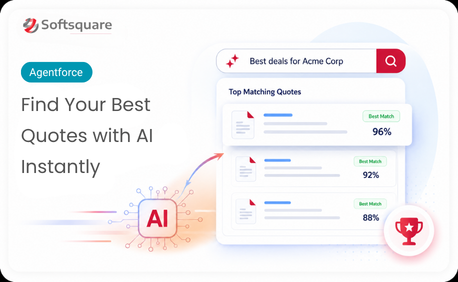
Table of Contents


Introduction
Every sales team has valuable deal knowledge sitting inside its CRM. Past quotes often contain the pricing approach, product combinations, discount reasoning, customer context, and deal logic that helped close previous opportunities.
But when a new opportunity comes in, sales reps may not know where to find the most relevant past quote. They may search manually, ask colleagues, or recreate the quote from memory. This slows down the sales process and can lead to inconsistent quoting across the team.
That is where Agentforce quote retrieval can make a practical difference. With an Agentforce-powered Quote Agent, sales teams can search past quote records using natural language and retrieve the most relevant examples directly from Salesforce. Instead of starting from scratch, reps can learn from similar deals that already worked.
Why Sales Teams Struggle to Find the Right Past Quotes
Salesforce may already store a large volume of quote records, but finding the right one is not always simple. A quote may include long-text notes, product details, pricing rationale, customer segment, discount details, and opportunity context.
The problem is that standard search usually depends on exact field values or keywords. It may not understand that two quotes are similar even when the wording is different.
For example, a rep may search for a quote related to enterprise software renewal, but the most relevant past quote may describe the deal as annual subscription pricing for a B2B platform. A keyword-based search may miss that connection.
Common challenges include:
- Reps do not know which past quote is most relevant
- Quote records may contain long notes and unstructured details
- Keyword search may miss similar deals with different wording
- Pricing logic and discount reasoning are difficult to reuse
- Sales reps depend on memory or internal conversations
- New reps struggle to learn from past successful quotes
- Quote preparation takes longer than it should
The issue is not a lack of quote history. The issue is that the right quote knowledge is not easy to find when reps need it.
What an Agentforce-Powered Quote Agent Does
An Agentforce-powered Quote Agent helps sales teams retrieve relevant past quotes from Salesforce using natural-language search.
Instead of manually opening old quote records one by one, reps can describe what they are looking for. The agent can then search past quote data, identify similar quote records, and return the most relevant matches.
A Quote Agent can help sales teams:
- Search quote history using natural language
- Find similar past deals based on meaning and context
- Retrieve relevant quote records from Salesforce
- Surface product details, pricing rationale, and quote context
- Help reps compare new opportunities with previous deals
- Support more consistent quote preparation
The goal is not to replace sales judgment. The goal is to make past deal knowledge easier to access, so reps can prepare better quotes with more confidence.
How Quote Agent Turns Past Deals Into Sales Intelligence
A Quote Agent turns historical quote data into searchable sales intelligence. Instead of treating past quotes as static records, the solution makes them useful for active sales work.
The Quote Agent workflow can be explained in three key steps: Index, Search, and Retrieve.
Index
Quote records are prepared for retrieval using Data Cloud vector search. This can include long-text quote details, product information, customer context, pricing notes, and discount reasoning.
Instead of relying only on keywords, the quote information is represented in a way that helps the system understand meaning and similarity.
This makes it possible to find relevant quotes even when the wording is not exactly the same.
Search
A sales rep can search using natural business language. The search may include product name, customer segment, deal type, pricing need, region, renewal type, or opportunity context.
For example, a rep may search for:
- Similar enterprise renewal quotes
- Quotes for a specific product bundle
- Deals with comparable discount structures
- Past quotes for a similar customer segment
- Pricing examples for a complex opportunity
This makes the search experience easier for sales users because they do not need to remember exact quote names, record numbers, or field values.
Retrieve
The agent retrieves the most relevant quote records based on similarity to the search context. The solution can surface the top three most relevant past quotes, ranked by semantic similarity.
Each result can include useful quote information, such as:
- Quote name or record link
- Product or service details
- Pricing approach
- Discount rationale
- Customer or opportunity context
- Reason why the quote is relevant
This helps reps move faster from quote research to quote preparation.
Our Solution: Agentforce-Based Quote Retrieval
Softsquare helps sales teams design and implement an Agentforce-based quote retrieval solution inside Salesforce.
The solution can be built around the company’s existing Salesforce quote data, sales process, product structure, and pricing workflow. Instead of introducing a disconnected search tool, the Quote Agent can support quote discovery within the Salesforce experience where sales teams already work.
Our solution can help with:
- Salesforce quote data preparation
- Data Cloud vector search setup
- Semantic quote retrieval
- Agentforce-powered natural-language search
- Prompt Builder-based result formatting
- Top relevant quote retrieval
- Quote reasoning and summary generation
- Salesforce-native user experience planning
- Customization based on products, regions, deal types, and quote fields
The solution can be configured based on how each sales team creates, approves, and reuses quote information. For example, one business may want to prioritize product similarity, while another may want to prioritize customer segment, contract type, region, or pricing model.
This makes Agentforce quote retrieval practical for real sales operations, not just a technical search use case.
How Quote Retrieval Improves Sales Operations
Quote retrieval improves sales operations by helping teams reuse the knowledge already captured in Salesforce.
When reps cannot find past quote examples quickly, they often depend on memory, internal messages, or guesswork. This creates inconsistency across teams and makes quote preparation harder for new reps.
With AI quote retrieval, sales teams can work from shared historical knowledge instead of isolated experience.
Key operational improvements include:
Faster Quote Research
Sales reps can reduce the time spent searching through old records. Instead of manually reviewing multiple quotes, they can retrieve relevant examples faster using natural-language search.
Better Quote Consistency
When reps reference similar past quotes, they can align new quotes more closely with proven pricing patterns, product combinations, and deal logic.
Stronger Knowledge Reuse
Past quotes often contain valuable lessons from successful deals. Quote retrieval helps make that institutional knowledge reusable across the team.
Easier Sales Enablement
New reps can learn from previous quote examples without depending entirely on senior team members. This helps shorten the learning curve and improves quoting confidence.
Reduced Internal Dependency
Reps do not always need to ask colleagues, managers, or sales operations teams to find similar quote examples. They can search directly inside Salesforce.
Better Support for Complex Deals
For complex opportunities, reps can compare current requirements with similar historical quotes before preparing a new proposal.
Current Challenge vs. How the Solution Helps
Key Benefits of Agentforce Quote Retrieval
For Sales Reps
Sales reps can find useful quote examples faster and prepare new quotes with more confidence. They do not need to depend only on memory or colleague recommendations.
Key benefits include:
- Faster access to relevant quote history
- Better understanding of similar past deals
- More confidence in pricing and product selection
- Less time spent searching manually
- Easier comparison between current and past opportunities
For Sales Operations
Sales operations teams can improve quote consistency and reduce repeated internal requests for past quote examples.
Key benefits include:
- Better reuse of historical quote data
- Improved visibility into quote patterns
- More consistent sales guidance
- Reduced dependency on manual quote research
- Stronger support for pricing governance
For Business Leaders
Business leaders can get more value from the quote history already stored in Salesforce. When sales teams use past deal knowledge more effectively, the quoting process becomes faster, more consistent, and easier to scale.
Key benefits include:
- Faster sales execution
- Better use of institutional knowledge
- Improved consistency across teams and regions
- Stronger quote governance
- Better support for sales productivity
Use Cases: Where Quote Agent Makes a Difference
Similar Deal Lookup
A sales rep is preparing a quote for a new opportunity and wants to find similar past deals.
The Quote Agent can search historical quote records and retrieve the most relevant examples based on product, customer segment, deal type, and pricing context.
Business value: This reduces research time and helps reps build on proven quote patterns.
Pricing Rationale Review
A sales rep or sales manager wants to understand why a specific discount or pricing structure was used in a previous quote.
The Quote Agent can surface relevant quote details and supporting rationale from past records.
Business value: This improves pricing confidence and reduces guesswork during quote preparation.
Product Bundle Reference
A rep needs guidance on which product combinations worked for a similar customer or deal type.
The Quote Agent can retrieve past quote examples that include similar product bundles, service combinations, or pricing structures.
Business value: This helps reps prepare stronger and more relevant quotes.
New Sales Rep Enablement
A new sales rep may not know where to find useful quote examples or which previous deals are worth referencing.
The Quote Agent makes historical quote knowledge searchable through natural-language questions.
Business value: This shortens onboarding time and helps new reps follow proven quoting practices faster.
Why Choose Softsquare for Agentforce Quote Retrieval
Softsquare helps businesses design Salesforce and Agentforce solutions around real operational needs.
For quote retrieval, this means we do not just configure an AI search experience in isolation. We look at the sales process, quote data model, product structure, approval flow, user roles, and business goals before designing the solution.
Softsquare can help with:
- Agentforce quote retrieval planning
- Salesforce quote data assessment
- Data Cloud vector search configuration
- Prompt Builder setup for quote result formatting
- Quote ranking and retrieval logic
- Salesforce user experience design
- Testing with real quote scenarios
- Customization for sales teams, regions, product lines, and pricing models
- Ongoing improvement based on user feedback
The result is a Salesforce-aligned quote retrieval solution that helps sales teams find and reuse relevant deal knowledge faster.
Conclusion
Your best quote knowledge should not stay hidden inside old CRM records.
Sales teams already have valuable pricing logic, product combinations, discount reasoning, and deal context stored in Salesforce. The challenge is making that knowledge searchable and useful when reps are preparing a new quote.
With Agentforce quote retrieval, sales teams can find relevant past quotes faster, improve quote consistency, and reuse winning deal knowledge directly inside Salesforce.
Softsquare can help you design and implement an Agentforce-powered Quote Agent that fits your sales process, Salesforce quote data, and business goals.
📩 Ready to help your sales team find relevant quotes faster? Talk to Softsquare → https://www.softsquare.biz/contact-us
Ready to Transform with AI?
Frequently Asked Questions
Agentforce quote retrieval helps sales teams search historical Salesforce quotes using natural language and find relevant past deal examples faster.
It can use semantic similarity to find related quotes even when the wording does not exactly match the user's search terms.
A Quote Agent can surface quote records, product details, pricing approaches, discount rationale, customer context, and why a past quote is relevant.
Vector search represents quote content by meaning, helping the system find semantically similar historical quotes instead of relying only on exact keywords.
Yes. It makes proven quote examples easier to discover, helping new reps learn from historical pricing, product combinations, and deal patterns.
No. It gives reps faster access to relevant historical knowledge so they can make better-informed quoting decisions.
Yes. Retrieval can be tuned around factors such as products, customer segments, regions, deal types, contract terms, and pricing models.
More Insights for you
















Ready to Transform Your Business with Salesforce & AI?
