

Agentforce vs Data Cloud: Key Differences Explained


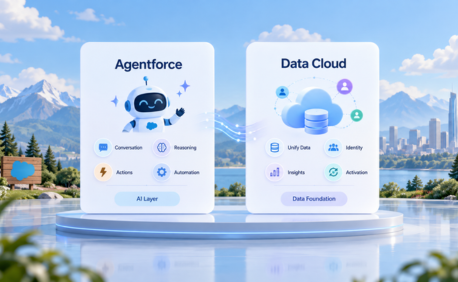
Table of Contents


The Expensive Assumption That's Stalling Salesforce AI Rollouts
Picture this: a Salesforce team is ready to deploy Agentforce for customer service automation. The AI agents are configured, the use cases are mapped, and stakeholders are aligned. Then someone in the room says, "Don't we need Data Cloud first?" The budget stalls. The timeline extends by six months. The rollout is shelved.
This scenario plays out across organizations every day and it is built on a myth. The assumption that Agentforce requires Data Cloud is one of the most costly misunderstandings in the Salesforce AI ecosystem today.
The reality is more nuanced. Agentforce and Data Cloud are two distinct, powerful products that can work independently or together depending on your organization's data maturity, use cases, and scale. Understanding the difference between Agentforce and Data Cloud and knowing when you need one, the other, or both is the key to launching your AI initiative without unnecessary delay or cost.
This guide breaks down exactly that. By the end, you will have a clear decision framework, real-world scenario guidance, and the confidence to architect the right Salesforce AI solution for your organisation.

What Is Agentforce? (And What Does It Actually Need to Work?)
Agentforce is Salesforce's autonomous AI agent platform. Unlike traditional AI tools that surface insights or recommendations for a human to act on, Agentforce agents reason, plan, and execute tasks directly inside the Salesforce platform without constant human intervention.
A configured Agentforce agent can handle customer inquiries end-to-end, update Opportunity records, qualify leads, manage cases, and escalate to a human only when genuinely required. It operates within defined topics and guardrails, making it both powerful and governable.
What Agentforce needs to function:
- Grounding source: A trusted data source the AI uses to inform its decisions
- Retrieval strategy: how the agent accesses and queries that data
- Topics & actions: what the agent is responsible for and what it can do
- Trust layer: security configuration controlling data access
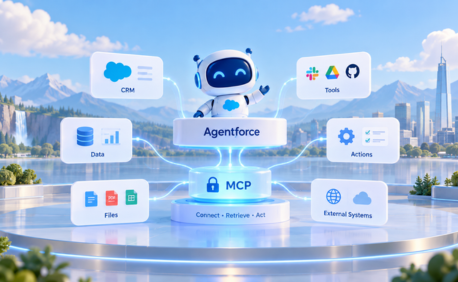
Critically, none of these four requirements mandate Data Cloud. Agentforce can be grounded using Knowledge Articles, Salesforce records, Files, and external systems via APIs — all without a Data Cloud license.
What Is Salesforce Data Cloud? (And What Problem Does It Solve?)
Salesforce Data Cloud is a real-time customer data platform (CDP) that sits at the centre of the Salesforce ecosystem. Its core job is to unify data from multiple, disparate sources CRM data, web behaviour, purchase history, marketing interactions, ERP records into a single, harmonised customer profile.
Core Data Cloud capabilities:
- Identity resolution: matching records across systems to create a unified customer profile
- Real-time ingestion: streaming data from external sources into Salesforce continuously
- Calculated insights: running complex aggregations and metrics across unified data
- Vector database: enabling semantic search for advanced AI grounding
- Data harmonisation: mapping diverse source schemas to a common data model
Data Cloud is a serious platform investment it requires data modelling expertise, governance planning, and ongoing ingestion pipeline management. For organisations with complex, multi-source data environments, this investment is absolutely justified. But for many Agentforce use cases, it is simply not required.
Agentforce vs Data Cloud: The Core Differences
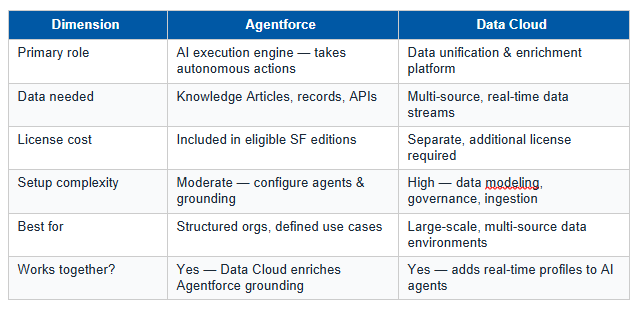
The table below maps the five most important dimensions across both products. Use this as your first-pass evaluation tool when scoping a Salesforce AI initiative.

When Agentforce Alone Is Enough: 4 Real-World Scenarios
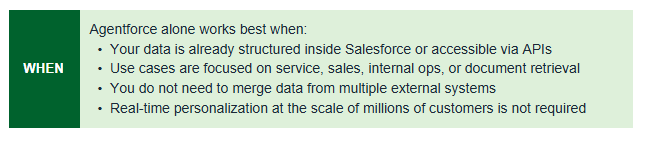
Agentforce delivers strong results without Data Cloud in any scenario where your data is already well-structured, well-indexed, and accessible within Salesforce or via APIs. Here are four practical examples:
Scenario 1: Customer Service Bot Grounded in Knowledge Articles
An Agentforce Service Agent can handle Tier-1 and Tier-2 customer inquiries by retrieving answers from Salesforce Knowledge Articles and escalating unresolved cases to human agents. No Data Cloud required the Knowledge Base is the grounding source.
Scenario 2: Sales Pipeline Assistant on Salesforce Records
An Agentforce Sales Agent can monitor pipeline health, follow up on stalled Opportunities, draft outreach emails, and update record stages — all by querying Opportunity, Account, and Contact objects directly via SOQL. Data Cloud is not part of this architecture.
Scenario 3: Internal HR or IT Help Agent via API Integration
An internal employee-facing agent can retrieve HR policies, IT ticket status, and approval workflows from Salesforce records and connected systems via MuleSoft APIs. The retrieval strategy uses API-based access, not a unified data lake.
Scenario 4: Document and File-Based Grounding
External documents — product manuals, compliance PDFs, pricing spreadsheets can be ingested into Salesforce Files and used as grounding sources for Agentforce agents. This expands the knowledge base significantly without needing Data Cloud's data pipeline infrastructure.
When You Actually Need Data Cloud Too: 5 Clear Signals
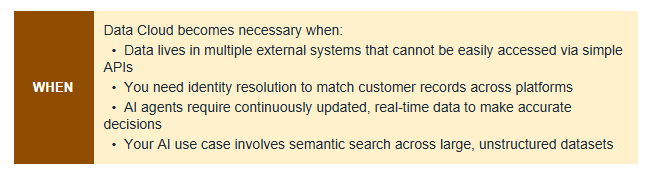
There are specific scenarios where Data Cloud transitions from "nice to have" to genuinely necessary. If any of the following signals apply to your organisation, Data Cloud belongs in your architecture:
- Signal 1: Siloed data across systems: Your data is siloed across multiple systems (ERP, marketing platform, website, CRM) and needs harmonization before AI agents can use it reliably.
- Signal 2: Real-time unified profiles: You need real-time unified customer profiles that merge online behavior, purchase history, and service interactions in a single view accessible to AI agents.
- Signal 3: Large-scale personalization: Your use case involves personalizing experiences at the scale of millions of customers, where static grounding sources cannot keep pace with data changes.
- Signal 4: Advanced grounding requirements: Advanced AI grounding requirements such as vector search, calculated insights, or identity resolution across data sources make basic record retrieval insufficient.
- Signal 5: Governance and compliance: Regulatory or compliance requirements mandate a unified data governance and audit layer across all customer data — something Data Cloud provides natively.
Designing Agentforce Grounding Without Data Cloud
If your evaluation confirms that Agentforce alone is the right starting point, here is how to design a reliable grounding architecture using Salesforce-native and API-connected sources.
Step 1: Audit your grounding sources
Review the quality, completeness, and accessibility of your Knowledge Articles, Salesforce records, and connected file libraries. Poor-quality grounding data produces poor AI outputs — garbage in, garbage out applies to Agentforce just as it does to any AI system.
Step 2: Define your retrieval strategy
Decide how each agent topic will retrieve its grounding data. Direct SOQL queries against Salesforce objects work well for structured record data. API-based retrieval via MuleSoft or REST APIs handles external system integration without requiring Data Cloud ingestion pipelines.
Step 3: Handle structured and unstructured data deliberately
Structured data (CRM records, transactional history) is naturally accessible via SOQL. Unstructured data (PDFs, policy documents, external reports) requires deliberate ingestion into Salesforce Files or Einstein Search plan this in your architecture design phase.
Step 4: Build reliability guardrails into your design
- Fallback mechanisms: define what happens when the primary grounding source returns no result
- Confidence thresholds: configure minimum confidence scores before the agent takes action
- Human escalation: set clear conditions under which the agent transfers to a human agent
- Logging & monitoring: enable full audit trails via Agentforce Testing Center and platform logging
Step 5: Validate with the Agentforce Testing Center before going live. Simulate real-world interactions, check grounding accuracy, and verify response times meet your SLA requirements.
The Decision Framework: Which Path Is Right for Your Org?
Use the three-path framework below to determine the right architecture for your Salesforce AI initiative. Match your organisation's data environment and use case profile to the appropriate path.

Most Salesforce organisations launching their first Agentforce deployment will find themselves on Path A or moving towards Path C. The important principle is to start with Path A wherever possible - get agents live and delivering value, then layer Data Cloud when the data complexity genuinely warrants it.
Conclusion: Don't Let the Data Cloud Question Stall Your AI Initiative
The Agentforce vs Data Cloud debate does not have a single right answer -it has the right answer for your organisation, based on your data environment, use cases, and scale.
For many Salesforce teams, Agentforce alone is a fully capable starting point. Grounded in Knowledge Articles, records, and API-connected systems, Agentforce can deliver autonomous, accurate AI outcomes without the cost, complexity, or timeline extension of a Data Cloud implementation.
Data Cloud earns its place when data complexity genuinely demands it multi-source environments, real-time unified profiles, identity resolution at scale, and advanced AI grounding requirements. In those scenarios, the investment delivers measurable ROI.
The key is to evaluate honestly, start lean, and scale deliberately. Launch with Agentforce where your data allows it. Add Data Cloud when your data complexity requires it.
Ready to Transform with AI?
More Insights for you








Ready to Transform Your Business with Salesforce & AI?
