

Meet the Enhanced FileMate: From File Intelligence to Salesforce Actions


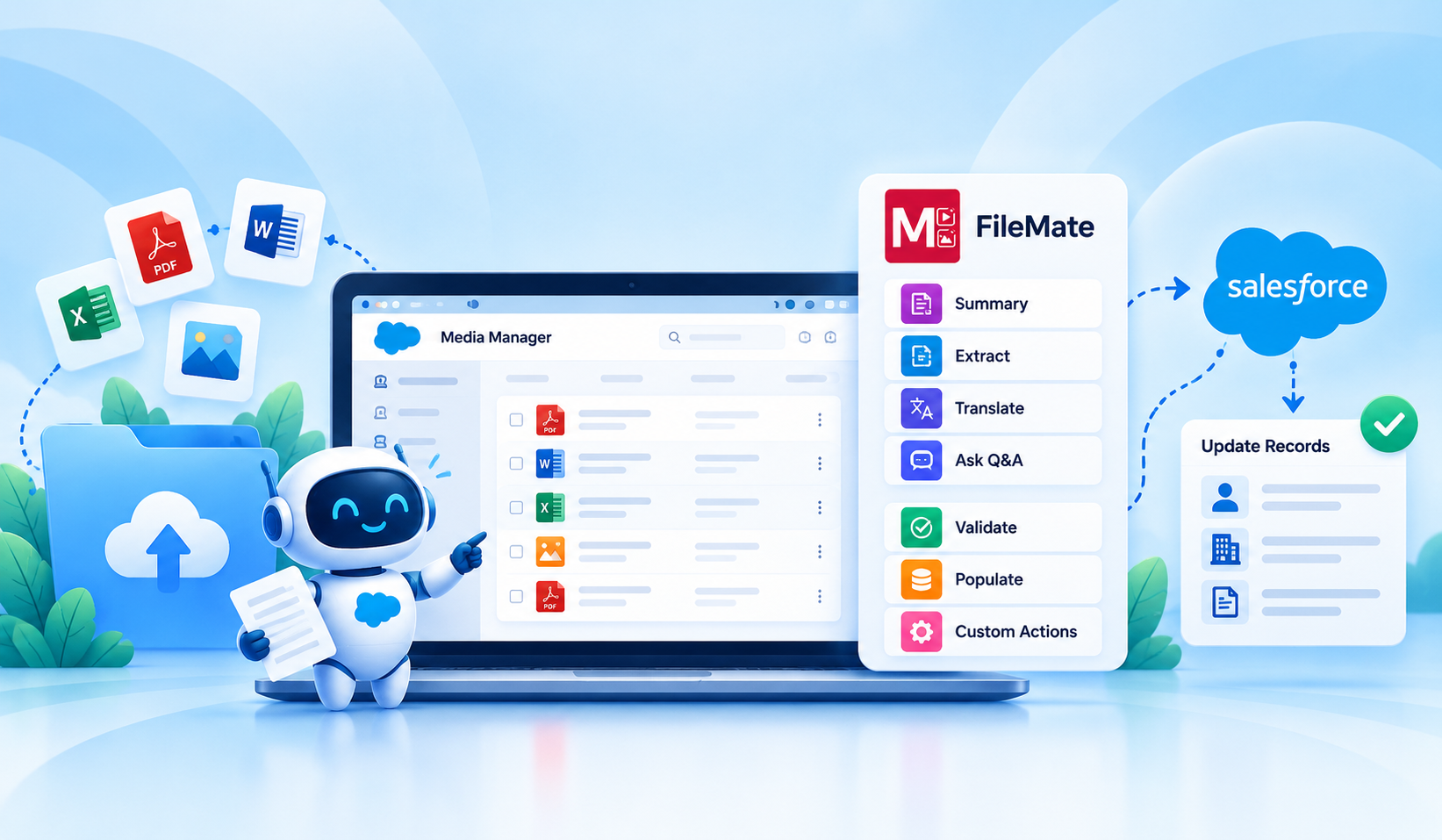
Table of Contents


Your Salesforce files are about to do a whole lot more!
Think about the information sitting inside your customer documents, invoices, agreements, application forms, and service reports. There's valuable business data in every file, but accessing it is only one part of the process. The real opportunity is in putting that information to work.
That's exactly what we're bringing with the enhanced FileMate!
FileMate, our Agentforce-powered add-on for Media Manager, already makes working with documents easier through summaries, extraction, translation, and Q&A. Now, we're expanding these AI actions for Salesforce files with smarter ways to validate information, populate Salesforce fields, and take action directly from files.
The enhanced FileMate is here, bringing more possibilities to the way you work with Salesforce files.
Understanding Files Was Just the Beginning
Think about how many everyday business processes rely on information submitted through documents.
A customer uploads an application form. A vendor sends an invoice. A service team receives an inspection report. A sales representative reviews a signed agreement.
Each file contains important information, but getting that information into Salesforce often involves multiple manual steps.
Teams frequently deal with:
- Manual data entry: Copying information from documents into Salesforce fields.
- Data inconsistencies: Comparing submitted information against existing Salesforce records.
- Repeated reviews: Reopening files to verify details or retrieve information.
- Disconnected actions: Extracting information but still having to update Salesforce records separately.
- Different business requirements: Needing more specific actions than standard AI summaries or extraction.
We introduced FileMate to bring the power of Agentforce for Salesforce files, helping users understand and retrieve information from their documents without the repetitive effort.
And it did just that.
But as we continued listening to evolving user needs, we saw another opportunity. Users didn't just want answers from their files. They wanted to use those answers to complete the work that followed.
What if FileMate could help with that next step, too?
That's where this release comes in.
Introducing the Enhanced FileMate for Salesforce
The enhanced FileMate takes file intelligence a step further, helping teams use AI to validate information from Salesforce files and connect document insights with the records and processes they work with every day.
Building on its existing Agentforce actions for Salesforce files, FileMate now offers more ways to validate information, populate Salesforce fields, and configure actions to match your business requirements.
Here's a quick look at how FileMate has evolved:
And the best part? These enhancements are available within the familiar Media Manager experience, without adding another disconnected tool to your everyday workflow
What's New in FileMate?
This release brings more than improvements to existing actions. It introduces new ways to turn information from Salesforce files into something your team can actually use.
Let's take a look.
1. Validate File Information Against Salesforce Records
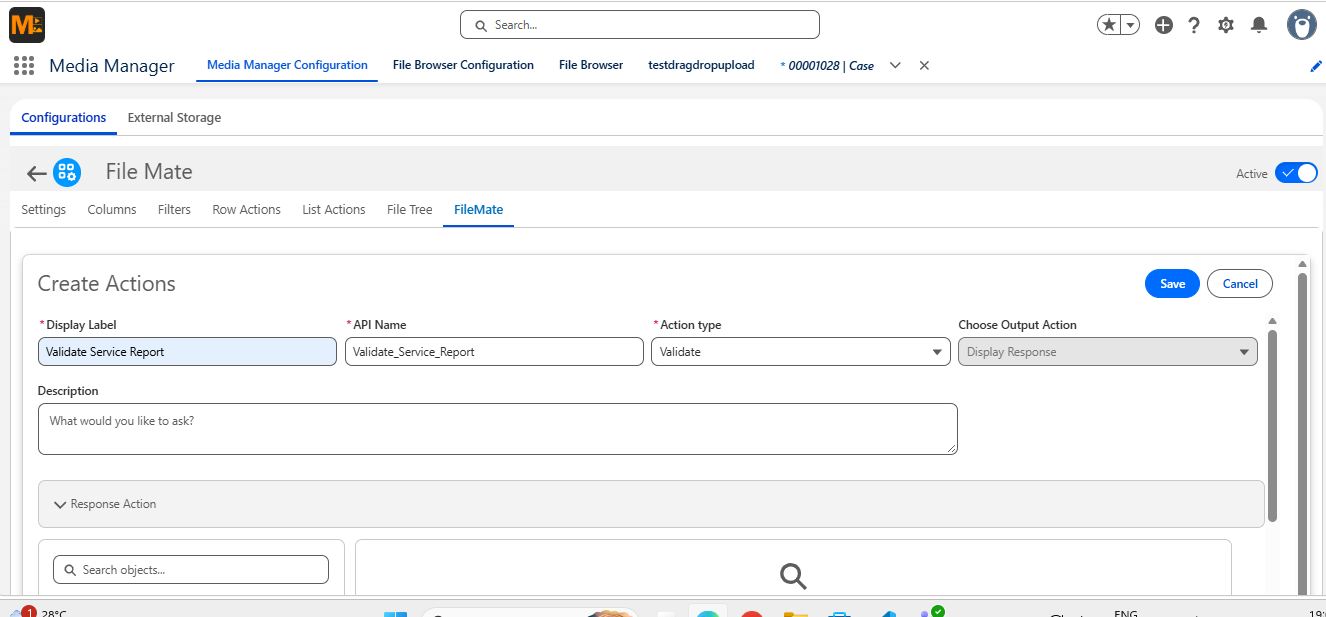
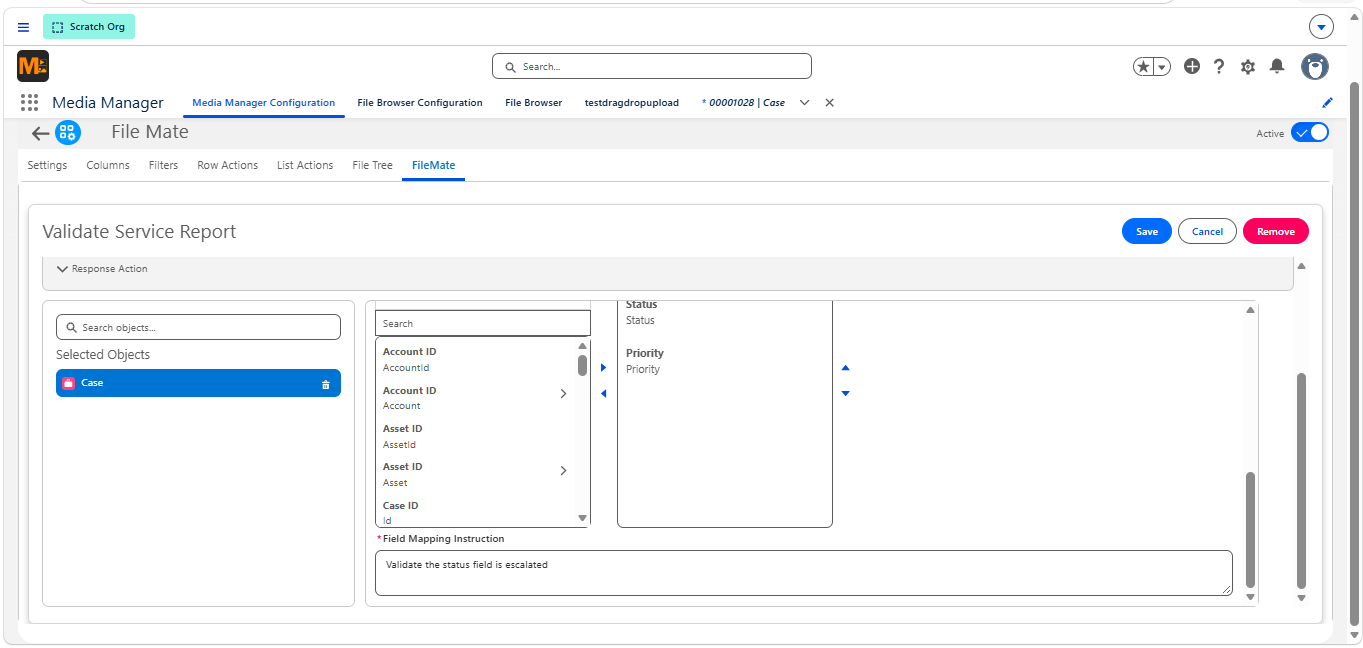
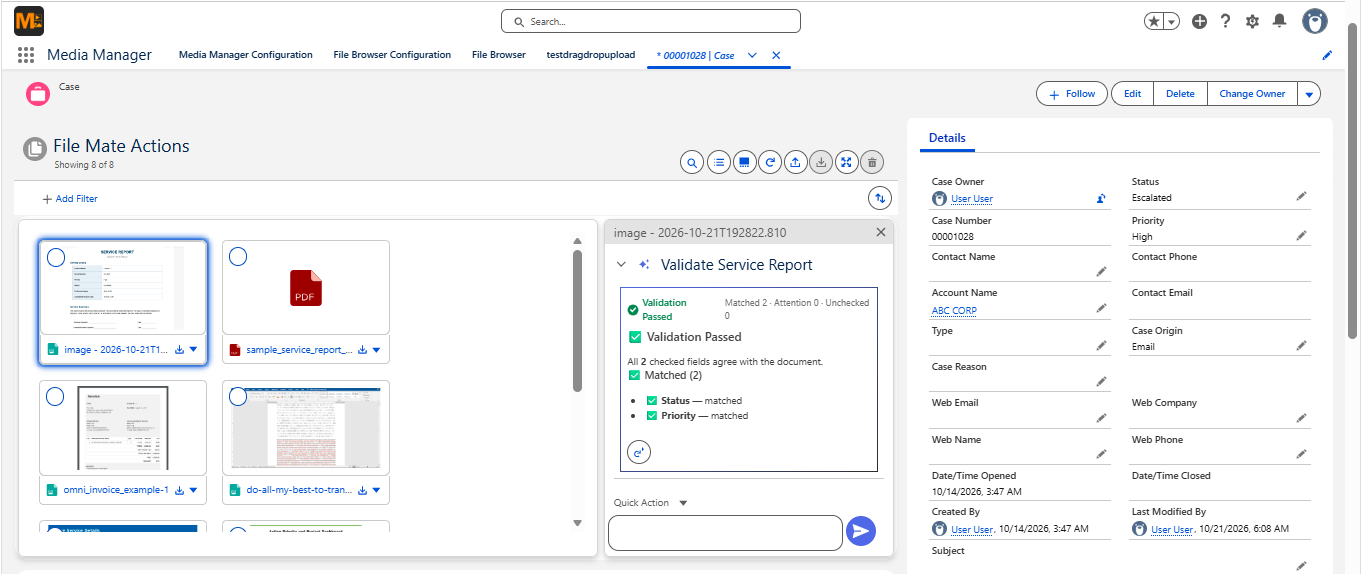
When document details don't match existing Salesforce records, manually identifying the differences can take time. FileMate uses AI to validate Salesforce files against configured record information, making discrepancies easier to identify.
With the new Validate action, FileMate helps you:
- Validate data extracted from Salesforce files against configured record fields.
- Identify matching and mismatched details.
- Review differences between document information and existing record values.
- Use the validation results to determine what needs attention.
For example, when a customer submits an updated application, FileMate can help compare its details with the existing Salesforce record, making discrepancies easier to identify.
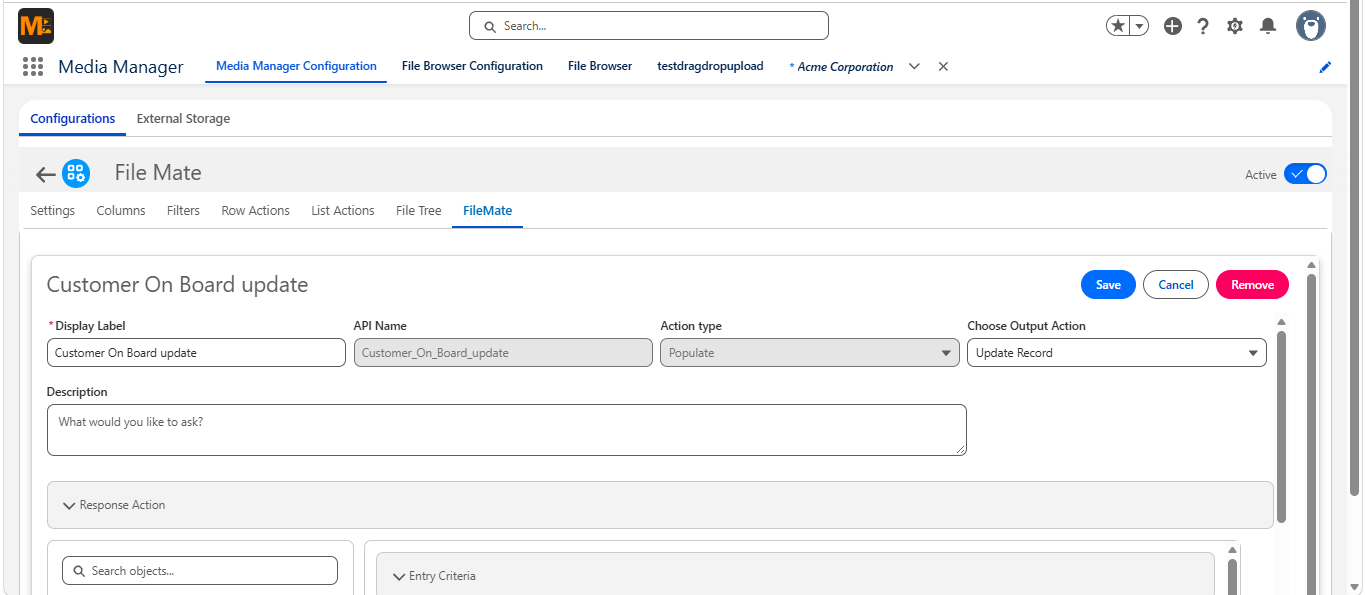
2. Populate Salesforce Fields from Files
Extracting information is useful. But manually entering that information into Salesforce afterward? That's another task altogether.
The enhanced Populate capability helps bridge that gap.
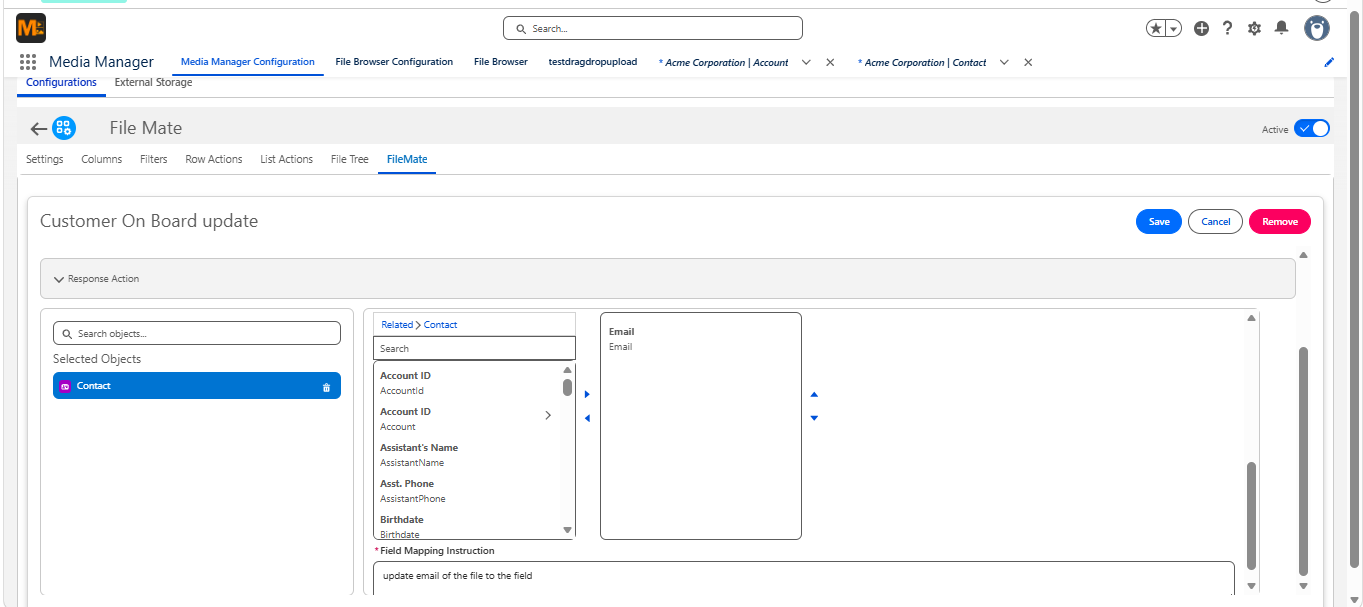
With configured actions, FileMate helps teams populate data from Salesforce files into the appropriate record fields. Here's what it can do:
- Extracts Map extracted values to designated Salesforce fields.
- Prepare updates for existing Salesforce records.
- Create child records using information from files, where configured.
- Let users review the generated values before proceeding with supported actions.
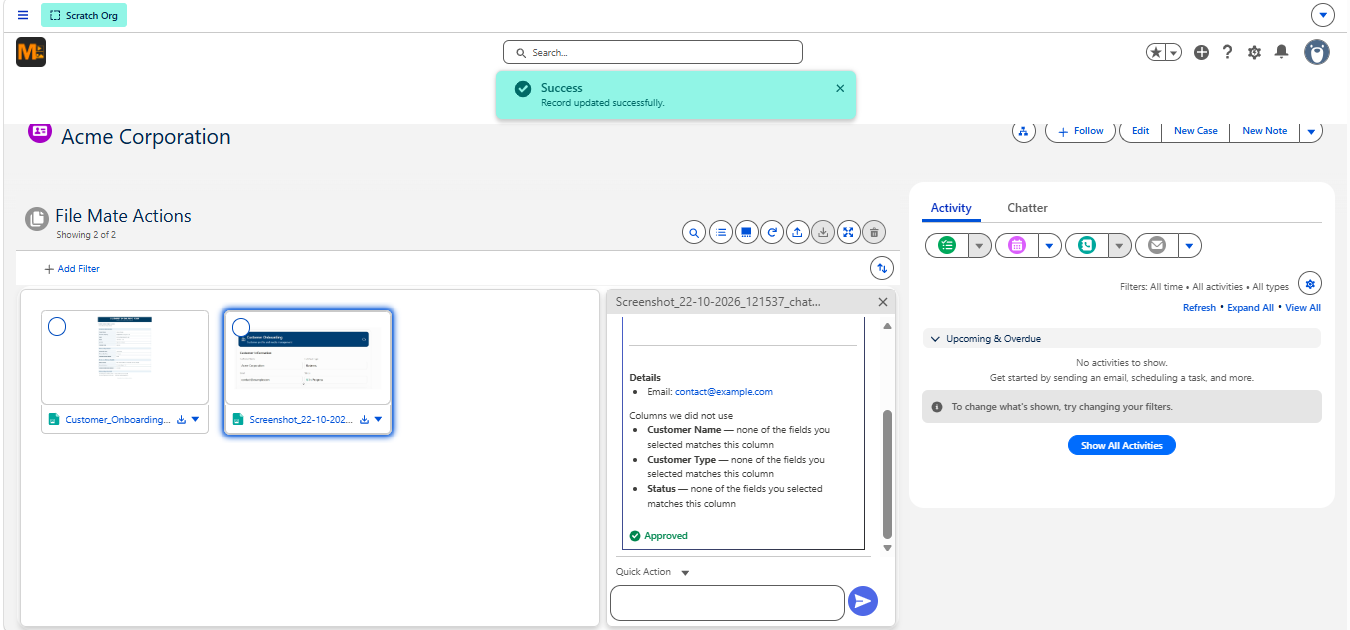
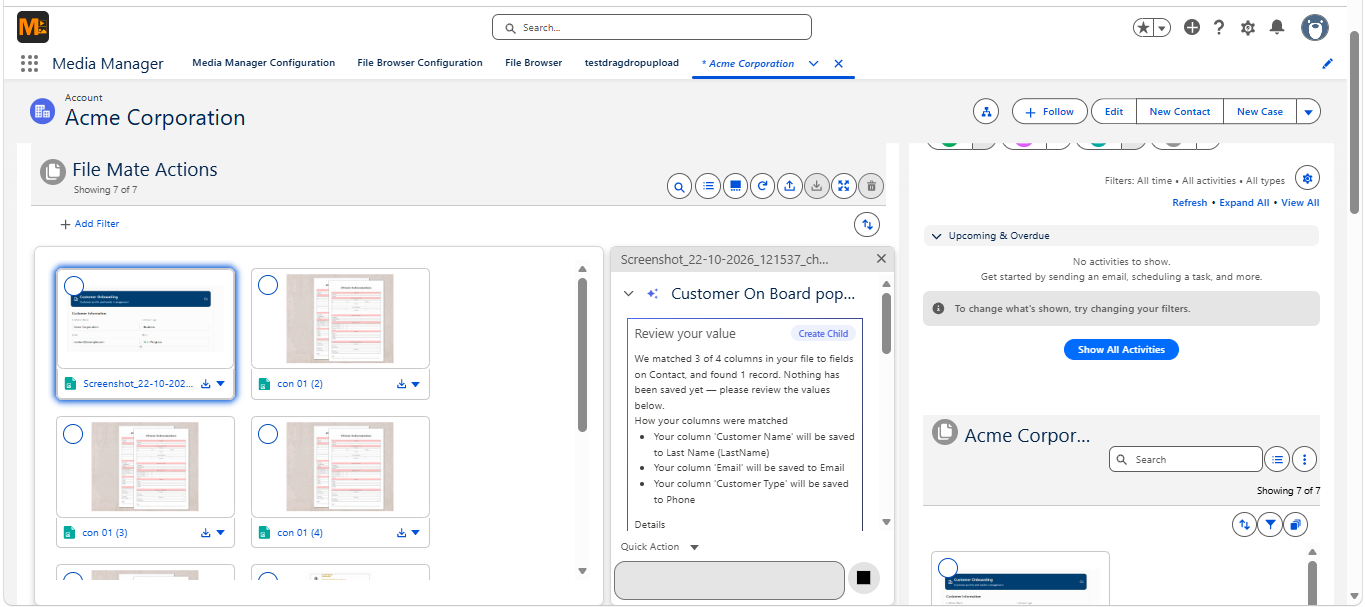
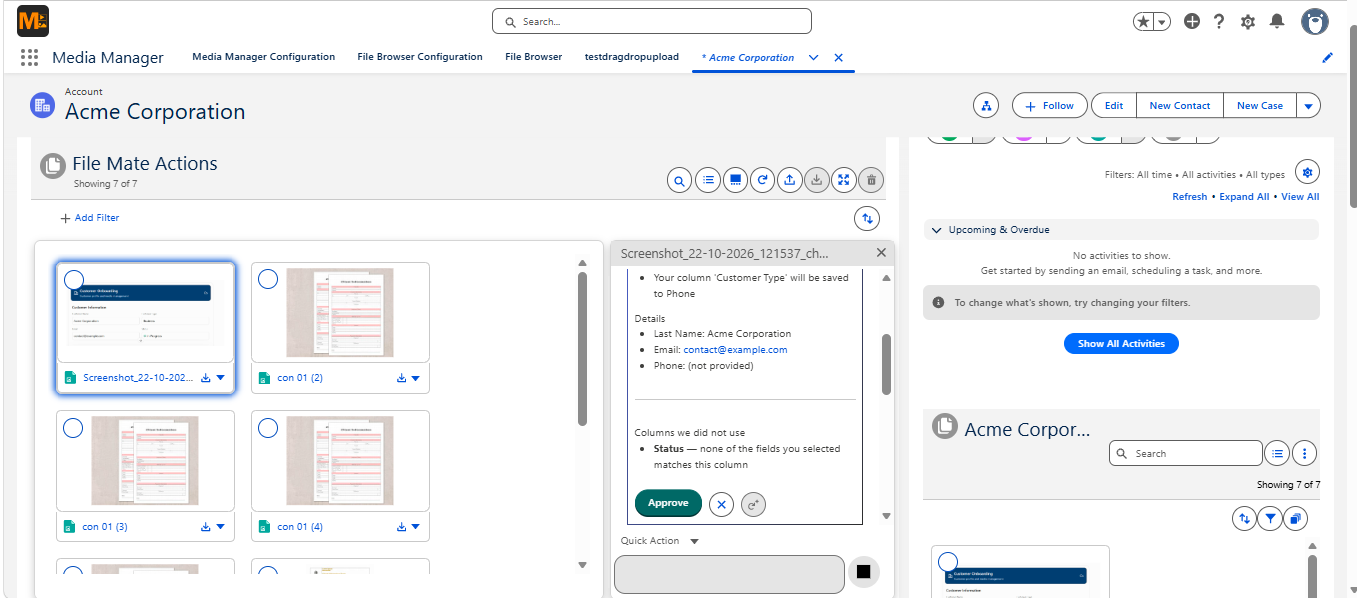
Imagine processing a customer onboarding form. Instead of copying details field by field, users can review the information FileMate has prepared and approve the appropriate record action.
3. More Flexibility with Custom File Actions
Every business handles documents differently, and standard AI actions may not always fit the task. That's where Custom File Actions in Salesforce give teams the flexibility to process documents around their specific requirements.
With enhanced Custom Actions, admins can tailor FileMate to different business requirements.
Depending on the action configuration, admins can:
- Define custom instructions for how files should be processed.
- Configure actions for specific Salesforce objects and business scenarios.
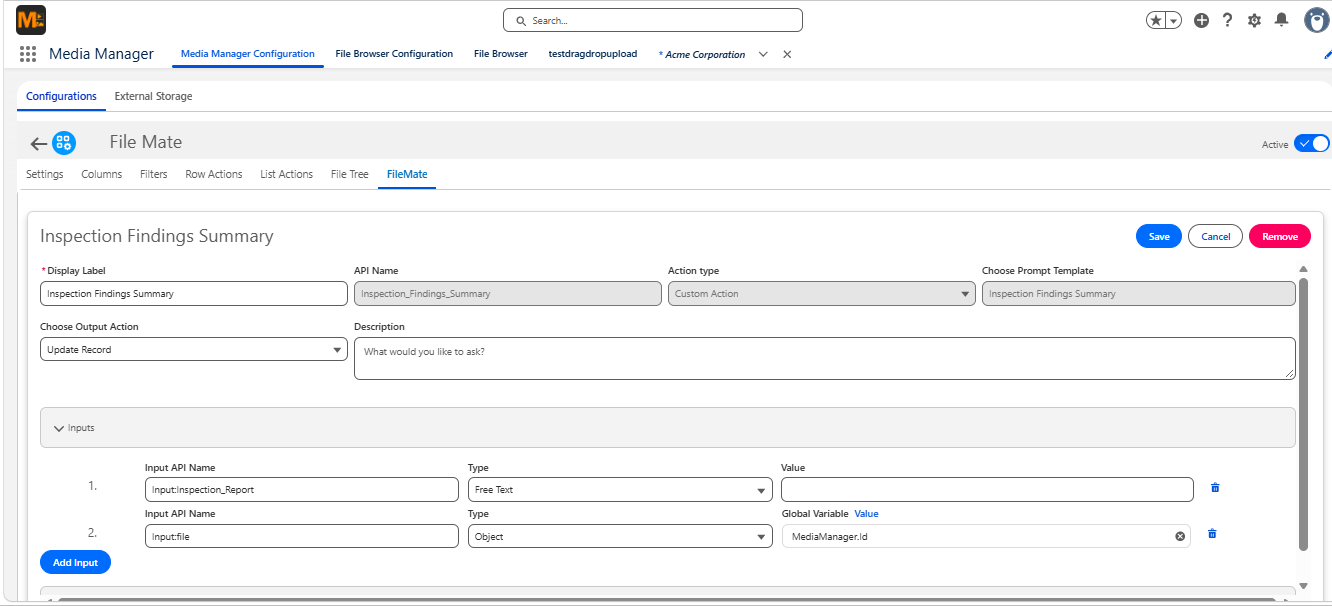
- Set up applicable conditions and field mappings.
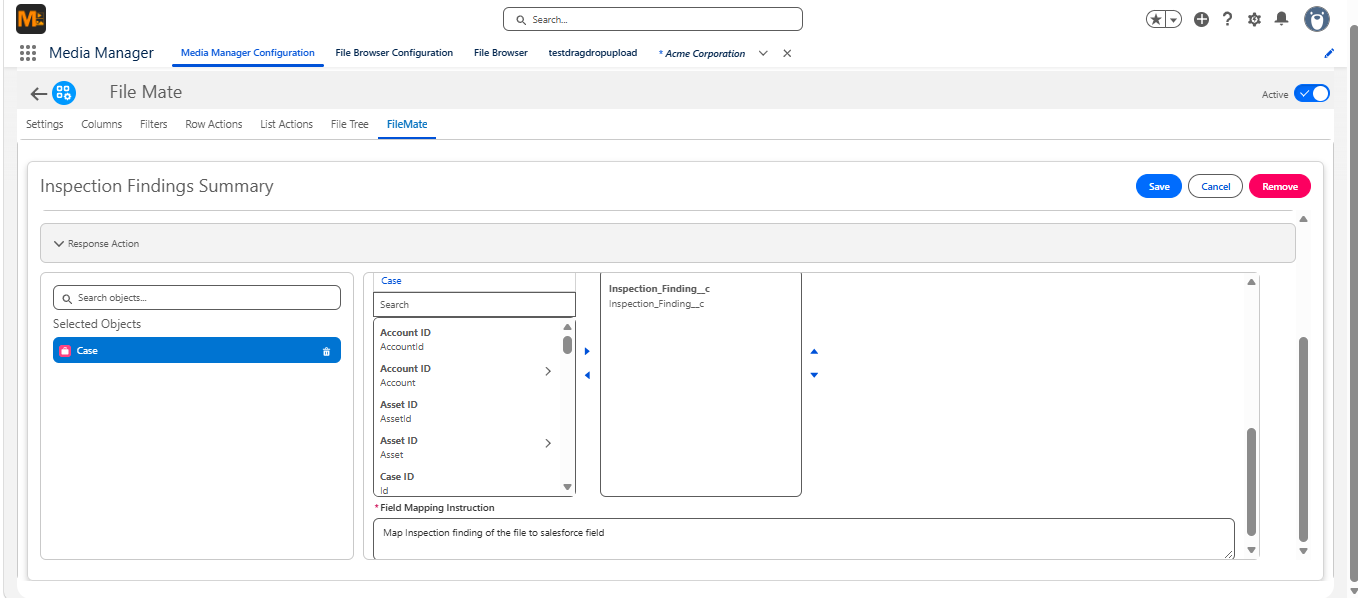
- Choose supported output behaviors for generated information.
- Make configured actions available through Media Manager.
For instance, a service team could configure an action to retrieve inspection findings and prepare the relevant information for a Salesforce service record.
This gives teams greater flexibility to work with their own document types and processes.
4. Review, Approve, and Take Action
AI can help prepare information faster, but users still need control over what gets applied to their Salesforce records. With AI file approval in Salesforce, FileMate lets users review generated information before proceeding with supported record actions.
The enhanced FileMate supports a review-driven experience for configured record actions.
Users can:
- View the information generated from the selected file.
- Review proposed field values before applying them.
- Approve or reject the results through supported actions.
- Proceed with configured record updates or child-record creation after approval.
This brings AI-powered assistance and user oversight together, helping teams work more efficiently without losing visibility into the results.
5. Familiar File Actions, Now with Greater Flexibility
The FileMate actions you've already come to know aren't going anywhere!
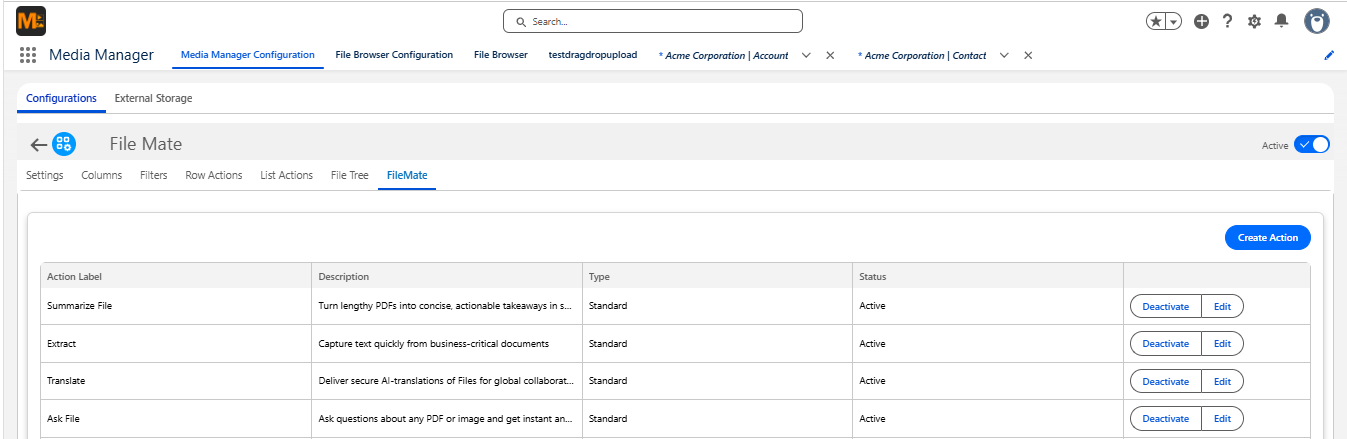
You can continue using its four core AI-powered actions:
- Summarize File: Turn lengthy documents into easy-to-read summaries.
- Extract File: Pull relevant information from supported PDFs and images.
- Translate File: Translate file content into different languages.
- Ask File: Ask questions about a file and receive answers based on its content.
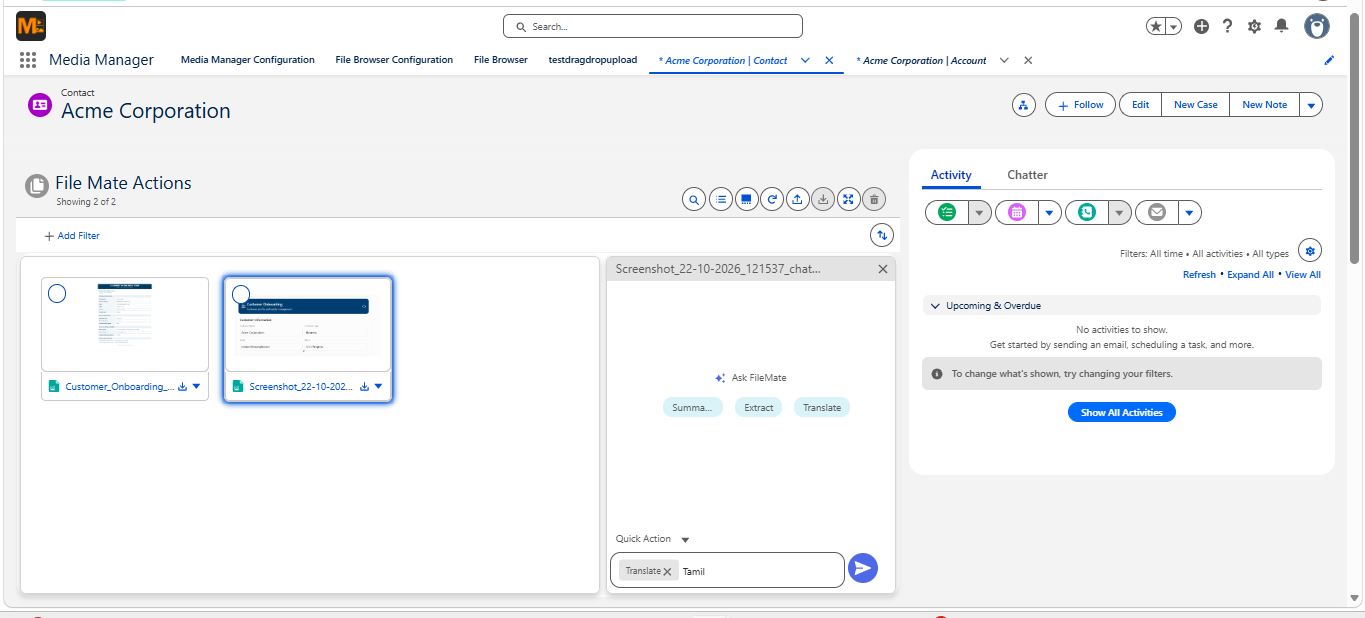
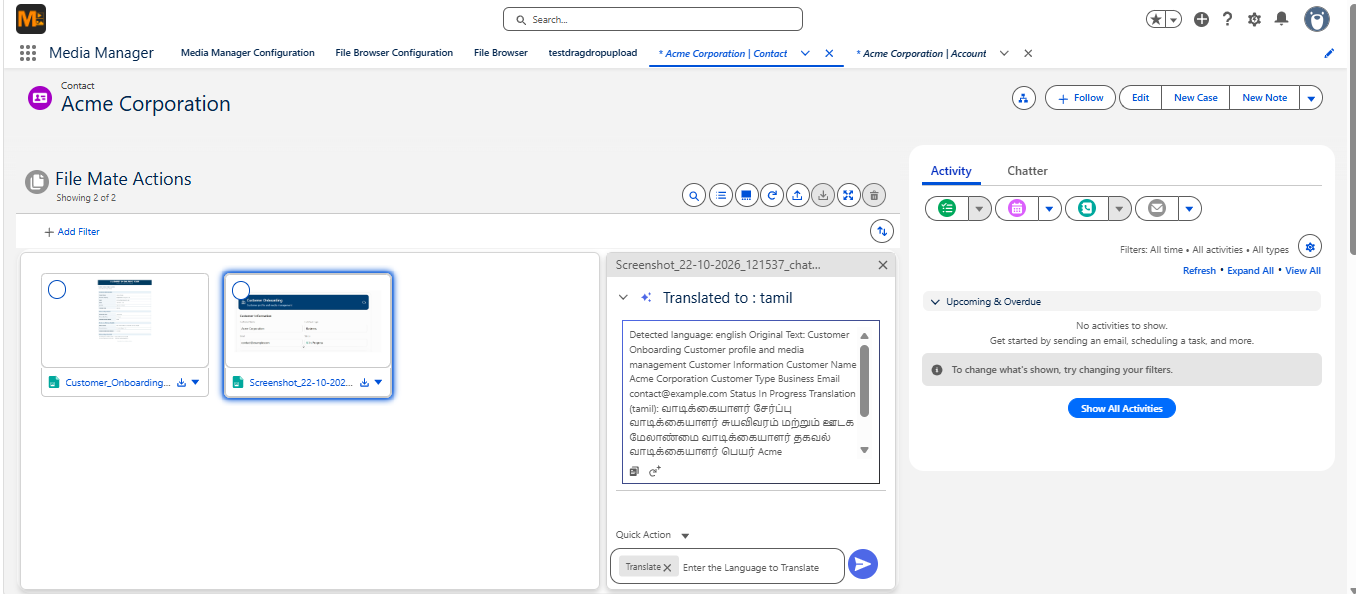
With the enhanced release, supported actions also offer additional configuration options to better match different business needs.
FileMate continues to support PDF, PNG, and JPEG files, making it useful for a wide variety of everyday documents.
Want to explore how each action works? Check out the FileMate User Manual for detailed capabilities and configuration guidance.
Where Can You Use the Enhanced FileMate?
Whether you need to review Salesforce files with AI, validate document information, or populate record fields, FileMate can support a variety of everyday business processes.
Here are a few ways FileMate can support different business processes:
- Customer onboarding: Extract information from onboarding forms, validate customer details against existing records, and prepare Salesforce fields for updates.
- Invoice processing: Retrieve invoice numbers, dates, amounts, and vendor information, then map the relevant details to configured Salesforce fields or records.
- Service and inspection reports: Summarize lengthy reports, identify important findings, and prepare extracted information for service-related records.
- Sales contracts and agreements: Extract contract dates, pricing details, and renewal terms, and compare the information against existing Salesforce data.
- Application and case processing: Review submitted application details, validate configured information, and prepare the necessary Salesforce record updates.
- Operations and document reviews: Configure custom actions to retrieve information from business documents and support department-specific processes.
Whether it's a sales agreement, customer form, or service report, FileMate helps teams move from reviewing documents to using the information they contain.
And because the actions are configurable, organizations can adapt them to the document workflows that matter most.
Getting Started with the Enhanced FileMate
Getting started doesn't require you to change the way you already manage files in Salesforce.
FileMate works as an add-on to Media Manager, allowing teams to access AI-powered file actions within their existing file management experience.
What Do You Need?
Before enabling FileMate, make sure you have:
- Media Manager installed and configured in your Salesforce org.
- The FileMate add-on package.
- The required Agentforce setup and configuration.
- A Media Manager configuration where FileMate Row Actions can be enabled.
How Does the Setup Work?
Once the prerequisites are ready, the basic process is straightforward:
- Open your existing Media Manager configuration or create a new one.
- Navigate to Row Actions and access FileMate.
- Enable the standard actions or configure the additional actions required.
- Define applicable instructions, Salesforce field mappings, and output behavior.
- Save your configuration and make the actions available to use
You can get started with the standard file actions and introduce more advanced configurations as your business needs grow.
For detailed instructions, permissions, and action-specific settings, follow our FileMate User Manual.
You can also visit our FileMate Feature Page to explore the complete experience.
Your Files Can Do More. Why Not Start Now?
We've always believed that managing Salesforce files should be more than just storing, organizing, and retrieving documents.
That's why we built FileMate in the first place. And with this enhanced release, we're bringing that vision a step closer to the everyday work your teams do.
From understanding documents to using AI to validate records in Salesforce files, populate fields, and prepare record updates, FileMate helps turn document information into something genuinely useful.
Less switching between files and records. Less repetitive work. More possibilities with the information you already have.
Already using Media Manager? You've got a great starting point to explore what FileMate can bring to your existing workflows.
New to FileMate? There's no better time to discover how AI-powered file actions can make working with Salesforce documents easier.
The enhanced FileMate is live and ready to explore!
Ready to Transform with AI?
Frequently Asked Questions
FileMate now supports file validation, Salesforce field population, customizable AI actions, and review and approval options, helping users do more with information in their files.
Yes. FileMate's Validate action compares information in a file against configured Salesforce record fields and helps identify differences.
Yes. With the Populate action, FileMate can prepare field values from documents for updating existing Salesforce records or creating child records, based on your configuration.
Yes. FileMate supports review and approval options for configured actions, so users can verify the results before applying supported record changes.
Yes. FileMate supports Custom File Actions, allowing admins to define instructions and configure actions based on specific document types and business requirements.
No. Users can access configured FileMate actions directly from Media Manager. Admins handle the initial setup and action configuration.
Yes. FileMate is an add-on to Media Manager. Once the required package and Agentforce configuration are in place, admins can enable FileMate through Media Manager's Row Actions.
More Insights for you






Ready to Transform Your Business with Salesforce & AI?
