

How Tech Scorecard Turns Scattered Technician Data Into Actionable Performance Intelligence


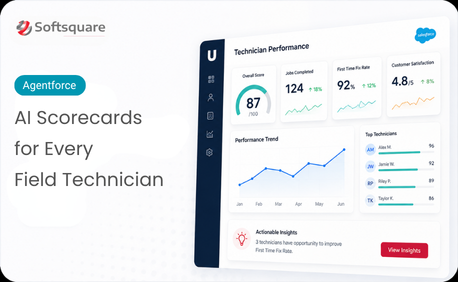
Table of Contents


Your best technicians are hiding in plain sight. So are your underperformers. So are the service patterns causing repeat delays, the teams that consistently close on first visit, and the individual skill gaps that training could close in a month.
The problem isn’t that this data doesn’t exist in Salesforce — it’s that it’s spread across work orders, service appointments, cases, assets, and activity logs. No single view. No single score. Just a maze of objects that operations managers have to manually cross-reference to reach any conclusion.
Tech Scorecard ends that. One model. One view. All the insight you’ve been missing.
The scattered data problem every field service team knows
Measuring technician performance in Salesforce today means running four reports, cross-referencing two spreadsheets, and asking a Salesforce admin to write a custom query — just to answer the question: “How is this technician actually performing?”
And when you do get an answer, it’s already out of date. By the time the data is assembled, the pattern you needed to act on last week is now last month’s problem. Operations managers make decisions based on gut feel, seniority bias, or whoever spoke up in the last meeting — not data.
How Tech Scorecard works: Consolidate, Analyze, Score
Tech Scorecard built on Prompt Builder and Salesforce creates a unified performance intelligence layer from your existing data. Three jobs, always running.
- Consolidate: Tech Scorecard pulls technician-related data from across Salesforce objects — work orders, service appointments, cases, resolution times, re-open rates, customer feedback — into a single unified insight model. One query. All the data.
- Analyze: Prompt Builder processes the consolidated data to identify productivity patterns, service delays, repeat issues, and performance trends — at individual technician, team, and operational level simultaneously.
- Score: The system generates clear, readable scorecards that surface what matters: who’s performing well, where delays are occurring, which patterns signal risk, and where targeted coaching will have the most impact.
What the scorecard actually shows you
Why Tech Scorecard — and why Prompt Builder
Other reporting tools can pull numbers. Prompt Builder turns those numbers into understanding. Here’s what makes Tech Scorecard different:
“We went from three reports and a gut feeling to a single scorecard that tells us exactly where to focus. For the first time, we’re managing performance with evidence — not assumptions.” — Operations Director, Velociti
The results operations teams are seeing
Velociti deployed Tech Scorecard to consolidate technician performance data across their field service operation. Impact: Operations managers now generate individual and team scorecards on demand; performance review cycles that previously took days of data preparation now take minutes.
- Faster performance reviews: Scorecard generation that took days of manual prep now takes minutes
- Earlier pattern detection: Delay trends and re-open risk signals identified before they become complaints
- Evidence-based coaching: Managers target development where data shows the highest impact
- Team visibility: Individual and team-level performance visible in a single unified view
- No new tools: Built entirely on Prompt Builder and existing Salesforce objects — no new platform required
Managing performance starts with seeing it clearly
You can’t coach what you can’t see. You can’t fix a delay pattern you haven’t identified. You can’t reward your best technicians if the data that proves their performance is buried across six Salesforce objects.
Tech Scorecard doesn’t change your data. It makes your data legible — so the decisions that were previously based on instinct can finally be based on evidence.
Ready to see your team clearly? Talk to Softsquare today →
Ready to Transform with AI?
Frequently Asked Questions
It is a consolidated view of technician performance indicators such as productivity, resolution time, repeat issues, SLA performance, and customer feedback.
It can use relevant data from work orders, service appointments, cases, assets, activity logs, resolution metrics, re-open rates, and customer feedback.
It brings relevant technician data together and turns it into a readable performance summary instead of requiring managers to cross-reference multiple reports.
Examples include jobs completed, resolution time, first-time fix rate, re-open rate, escalations, SLA breaches, customer feedback, and performance trends.
Yes. The scorecard can be designed to provide individual, team, region, or other relevant operational views based on the available data.
By analyzing recurring patterns such as delays, repeat visits, escalations, or changing service quality, it can highlight areas that may benefit from coaching.
Not necessarily. It can complement dashboards by synthesizing distributed information into a more readable performance narrative and decision-support view.
More Insights for you















Ready to Transform Your Business with Salesforce & AI?
