

How ConversationAction Agent Turns Voice Notes into Summaries, Tasks, and Follow-Up Actions - Automatically


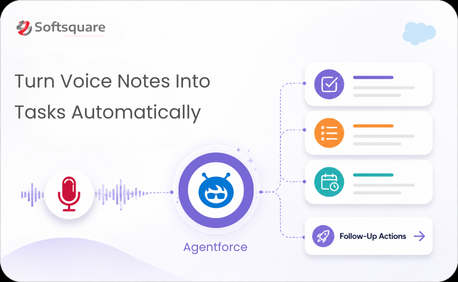
Table of Contents


Your team records voice notes after every customer call, field visit, and internal meeting. And then someone has to listen to them, write the summary, identify the action items, create the tasks in Salesforce, and trigger whatever follow-up was agreed. Manually. One by one.
It’s not that the process is broken — it’s that every step after the recording is still human. Which means it’s slow, it’s inconsistent, and details get lost between the audio and the action.
ConversationAction Agent closes that gap completely.
The manual middle that every team wants to eliminate
Voice notes are one of the most natural ways for field teams, sales reps, and managers to capture information in the moment. The problem is what happens next. Converting a three-minute voice note into a Salesforce task, an email follow-up, and an updated opportunity record requires four separate manual steps — minimum.
At scale, that overhead compounds. Teams under-process their voice notes because the follow-through takes too long. Decisions made in conversations stay in audio files. Action items fade. The value of the recording is only as good as the discipline of whoever is supposed to action it.
How ConversationAction Agent works: Upload, Process, Act
ConversationAction Agent built on Agentforce and Agentforce Actions handles everything between the recording and the outcome. Three steps, fully automated.
- Upload: A team member uploads an audio file to the agent interface — a post-call voice note, a field observation recording, or a meeting recap. No transcription required in advance.
- Process: Agentforce processes the audio, generates a structured summary, and identifies action items, decisions, and follow-up requirements embedded in the conversation.
- Act: Agentforce Actions automatically creates the relevant tasks in Salesforce, triggers associated workflows, and generates follow-up communications based on what was said without any manual intervention.
What disappears when the manual middle is automated
Why ConversationAction Agent — and why Agentforce Actions
The key word is “Actions”. Agentforce doesn’t just summarize — it acts. Here’s what makes ConversationAction Agent different from a transcription tool:
We went from voice note to Salesforce task in under a minute. The manual step in the middle — the one that caused half our action items to disappear is just gone.” — Sales Operations Lead · Softsquare
The results teams are seeing
Softsquare deployed ConversationAction Agent internally to process post-call and field visit voice notes across the sales and operations teams. Impact: Task creation from voice notes went from a 10–15 minute manual process to under 60 seconds per recording; action item follow-through improved as a direct result of automatic task generation.
- Time saved: 10–15 minutes of manual processing per voice note eliminated
- Action item capture: Every commitment made in a conversation becomes a task automatically
- Consistency: No variation in processing quality based on who handles the follow-up
- In-Salesforce output: Tasks and records updated directly via Agentforce Actions
- Scalable: Handles multiple audio files simultaneously — scales with team volume
Every conversation your team has is an action waiting to happen
The insight is in the audio. The decision is in the recording. The action item was said out loud — and then got lost somewhere between the voice note and the task that should have followed it.
ConversationAction Agent makes sure the gap between conversation and action is zero. What was said becomes what happens next — automatically, accurately, every time.
Ready to close the gap between conversation and action? Talk to Softsquare today →
Ready to Transform with AI?
Frequently Asked Questions
ConversationAction Agent turns uploaded voice notes or audio into structured information such as transcripts, summaries, action items, and Salesforce follow-up activities.
The solution can process the audio, summarize the conversation, identify agreed actions, and trigger configured follow-up steps in Salesforce.
Yes. When the workflow is configured to do so, identified action items can be converted into Salesforce tasks or other supported actions.
Yes. It can turn recorded conversation content into a concise summary so users do not need to manually replay the entire recording.
Yes. The processing workflow can extract action items, recommended next steps, and other structured information from the conversation.
Sales reps, field teams, service users, managers, and other employees who regularly capture customer or internal updates through voice notes can benefit.
It should be configured to identify relevant information and execute only approved actions according to the organization’s workflow and business rules.
More Insights for you












Ready to Transform Your Business with Salesforce & AI?
