

Understanding Salesforce Agentforce MCP


.svg)
Table of Contents


Salesforce is moving from traditional automation toward AI-driven execution. With Agentforce, teams can build agents that do more than answer questions. They can retrieve context, use tools, and complete actions across systems. That is where Model Context Protocol (MCP) becomes important. Salesforce describes MCP support as a way to connect Agentforce to tools and resources with secure, open interoperability.
In simple terms, MCP gives AI agents a standard way to connect with tools, data, and services. Instead of building a separate custom integration for every agent interaction, teams can use a more structured approach. Salesforce developer documentation describes MCP as foundational to Agentforce’s agentic capabilities because it standardizes tool discovery, execution, and results integration.
For Salesforce teams, this matters because enterprise workflows rarely live in one system. Service operations, finance processes, internal apps, external APIs, and CRM data often need to work together. MCP helps reduce that integration friction and gives Agentforce a cleaner path to interact across systems. If you are evaluating how this fits into your roadmap, this is also where a partner with hands-on Salesforce Agentforce services and Salesforce integration services becomes relevant.
What Is MCP in Salesforce?
In the Salesforce ecosystem, MCP is the protocol that helps agents connect to external tools and services through a standard interface. It supports tool discovery, execution, and result handling in a way that is more reusable than one-off integrations. That makes it easier to design agents that can act, not just respond.
You can think of MCP as the connection layer between an AI agent and the systems it needs to work with. Salesforce has also expanded MCP guidance across its official developer and platform resources, showing that this is not a side concept but part of the broader Agentforce direction.
Why MCP Matters for Salesforce Teams
Salesforce teams already manage integrations across CRM, service tools, billing systems, internal platforms, and partner applications. But AI agents need more than access. They need context, available actions, and a reliable way to use tools. MCP helps give Agentforce that standardized interaction model.
This becomes especially important when Agentforce moves beyond simple conversational assistance into real business execution. For example, an agent may need to understand the request, identify the right tool, retrieve supporting context, and complete the next action. Salesforce’s Agentforce developer resources and MCP documentation frame exactly this kind of tool-connected behavior as core to agentic workflows.
If your organization is already exploring broader Salesforce AI solutions, MCP is one of the architecture topics worth understanding early because it directly affects how scalable your future agent workflows will be.
How Agentforce MCP Works
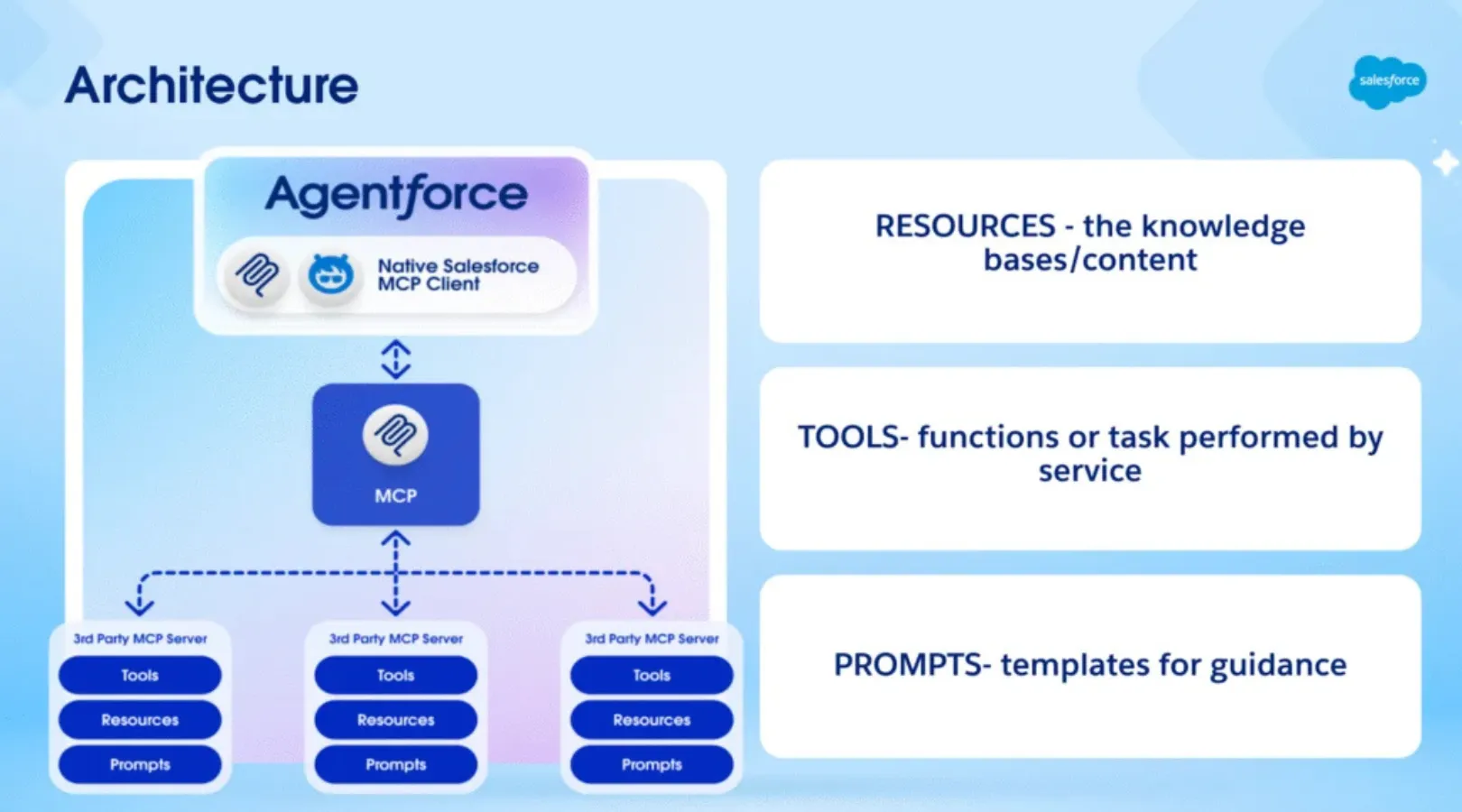
At a practical level, Agentforce handles the reasoning, while MCP helps the agent connect to the tools and services required to complete work. That means an agent can interpret a request, identify the right action, use a supported tool, and return a useful result without relying on rigid point-to-point logic for every scenario.
Salesforce has also documented support for remote MCP servers, which extend Agentforce beyond built-in tools and allow connection to external services, APIs, and third-party platforms. For Salesforce architects, that is the real value: more reusable and maintainable agent-to-tool connectivity.
Practical Salesforce Use Cases
MCP becomes valuable when Agentforce needs to work across records, systems, and actions instead of staying inside one prompt.
For service operations, an agent can pull case context from Salesforce, use connected tools to gather supporting information, and help guide or trigger the next step. This aligns with Salesforce’s broader positioning of Agentforce for cloud-specific execution and action support.
For sales execution, an agent can work with account context, next-best actions, related records, and supporting systems without forcing users to move between disconnected apps. Salesforce positions Agentforce as an action-oriented AI platform rather than just a chat interface.
For custom enterprise workflows, MCP helps teams connect agents to internal APIs, external services, and business tools in a more maintainable way. This is especially relevant for organizations planning custom Agentforce implementations or extending AI beyond out-of-the-box use cases. You can see a related example in Softsquare’s own Agentforce thought leadership, including The Agentic Enterprise in Salesforce and Create Apps and Code Faster with Agentforce Vibes.
Business Value of Agentforce MCP
The value of MCP is not the protocol by itself. The value is what it enables for Salesforce teams.
It can support faster agent rollout because tool connectivity becomes more standardized. It can support better scalability because AI use cases do not have to depend entirely on isolated custom integrations. Salesforce’s official MCP positioning emphasizes both secure interoperability and broader enterprise adoption.
It also supports stronger governance. Salesforce’s official considerations and release messaging make it clear that enterprise trust, support boundaries, and operational control are part of the Agentforce rollout conversation.
What Salesforce Teams Should Keep in Mind
Before adopting Agentforce MCP, teams should think about tool design, governance, and architecture fit.
Tool design matters because the agent is only as useful as the actions and systems it can access. Governance matters because permissions, support limits, and monitoring become important as soon as agents begin taking action in real workflows. Salesforce explicitly calls out support, limits, and implementation considerations in its Agentforce documentation.
Architecture fit matters too. MCP is especially useful when your Agentforce roadmap includes multiple systems, reusable actions, or custom workflows. For narrower use cases, simpler configurations may still be sufficient.
Conclusion
Salesforce Agentforce MCP matters because it gives agents a more structured way to connect with tools, data, and business systems. That gives Salesforce teams a stronger foundation for building AI experiences that are actionable, scalable, and easier to manage over time.
For teams evaluating Agentforce seriously, MCP is not just a technical detail. It is part of the architecture that can shape how well your Salesforce AI strategy scales. If you are exploring where to start, review Salesforce’s official Agentforce MCP Support, the Agentforce Developer Center, and the Agentforce MCP developer guide. To evaluate implementation options, you can also explore Softsquare’s Salesforce Agentforce AI Solutions.
Ready to Transform with AI?
More Insights for you








Ready to Transform Your Business with Salesforce & AI?
