

Agentforce for Service Teams: Routing Service Tickets to the Right Team


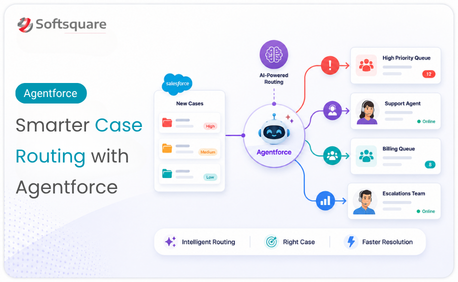
Table of Contents


In Salesforce case management, the first step is often the most important: getting the case to the right team. But when cases are created from emails, forms, portals, chats, or internal requests, the details can be inconsistent and difficult to classify manually.
Without a smarter routing process, support teams may spend time correcting case categories, moving tickets between queues, and reviewing details that should have been handled earlier in the workflow.
This is where Agentforce service agent becomes valuable. With the right Salesforce setup, Agentforce service agent can support case classification, automated ticket routing, case summarization, and Service Cloud automation so support teams can focus more on resolution.
Why Manual Case Triage Slows Down Service Teams
Manual case triage depends on someone reading the case, understanding the issue, assigning the right category, and routing it to the right team. That may work with low case volume, but it becomes difficult when support teams handle cases across products, regions, priorities, and support levels.
- Cases being routed to the wrong queue
- Support teams spending time on issues outside their skill area
- Supervisors manually reviewing incoming tickets
- Urgent cases being identified too late
- Customers repeating information after handoffs
- Inconsistent category, priority, and escalation decisions
The problem is not only the time spent assigning cases. The bigger issue is the delay it creates before resolution even begins. Every misrouted case adds friction for the customer and extra work for the support team.
What is Agentforce Service?
Agentforce service agent helps support teams use Salesforce, automation, and AI-powered guidance to manage incoming customer requests more intelligently.
For case classification and routing, Agentforce service agent can help identify what a case is about, understand the urgency, recommend the right route, and provide useful context to the support team. Instead of depending only on manual review or static rules, support teams can use Agentforce service agent to turn incoming case details into structured service actions.
In a Salesforce case management process, this can support:
- Case classification
- Case priority identification
- Queue or team routing
- Case summarization
- Escalation support
- Support team guidance
- Service workflow automation
The goal is not just to move tickets faster. The goal is to make sure each case reaches the right team with the right context.
How Agentforce Turns Incoming Cases Into Service Actions
Agentforce can support the service journey from the moment a case is created. Instead of treating every incoming ticket as a manual review task, the case can be classified, routed, summarized, and prepared for resolution.
Classify the Case
Agentforce can help identify the case type, issue category, subcategory, and urgency based on the customer's message and available Salesforce data.
For example, a customer message about a failed payment, delayed delivery, product error, or access issue can be classified into the right service category reducing dependency on support teams or supervisors manually selecting categories for every case.
Route to the Right Queue or Team
Once the case is classified, Agentforce case routing can help send it to the right queue, team, or specialist based on configured business rules. Routing can be designed around factors such as:
- Case type and product line
- Customer region and priority level
- SLA requirement
- Support group or specialist skill
- Escalation condition
This helps reduce wrong-queue assignments and unnecessary handoffs.
Summarize the Case for Faster Handoff
Support teams often lose time reading long descriptions, previous interactions, or unclear customer messages. Agentforce can help summarize the case so the right team understands the issue faster. A useful case summary may include the customer issue, case category, urgency level, related history, suggested next step, and key details for handoff.
Escalate Priority Cases Earlier
Some cases need faster attention because they involve service outages, frustrated customers, SLA risks, or high-value accounts. Agentforce can help identify priority or escalation-risk cases earlier based on configured signals and routing rules allowing support teams to respond before the issue becomes more difficult to manage.
Where Agentforce Improves Case Management
Our Solution: Agentforce Service Routing for Salesforce Teams
Softsquare helps businesses design and implement Agentforce service solutions that improve case classification, routing, and resolution inside Salesforce. The solution can be configured around the client's service process, case types, support model, SLA structure, and routing rules.
- Incoming case analysis
- Case category and priority classification
- Agentforce case routing
- Automated ticket routing rules
- Queue, team, or specialist assignment logic
- Case summary generation
- Escalation workflow support
- Service Cloud automation
- Salesforce case management configuration
- Business rules and guardrails based on process needs
The solution can be customized based on products, service regions, customer segments, priority rules, support teams, and escalation paths.
How Support Teams Benefit From Agentforce Service
Agentforce service helps support teams reduce manual triage and improve how cases move through Salesforce.
- Faster case assignment: Incoming cases can be classified and routed without waiting for manual review.
- Fewer misrouted tickets: Cases can reach the right queue or team earlier in the process.
- Better support team productivity: Support teams spend less time reading, reassigning, and clarifying cases.
- More consistent routing decisions: Routing can follow defined business rules instead of depending only on manual judgment.
- Improved service visibility: Managers can better understand how cases are classified, routed, and escalated.
- Stronger Service Cloud automation: Case handling can be connected with Salesforce workflows, queues, tasks, and escalation rules.
How Agentforce Improves Case Resolution Outcomes
Case resolution becomes faster when support teams receive the right case with the right context. Agentforce supports case resolution by reducing the effort required before the team can begin solving the issue.
For support teams, this means they can quickly understand what the customer needs, why the case was routed to them, how urgent the issue is, what previous context may matter, and what next step may be required.
This improves the support experience because the work starts with clarity. For customers, the case reaches a more relevant team, the team has better context, and the resolution process can begin sooner.
Key Benefits of Agentforce Service Agent for Case Routing
For Support Teams
Agentforce service helps support teams work with better context and fewer wrong assignments. They can focus more on resolving cases and less on deciding whether the case belongs to them.
- Better case summaries
- Fewer irrelevant assignments
- Faster understanding of customer issues
- More confidence during case handling
For Service Managers
Service managers can reduce manual triage effort and improve consistency across case assignment. They also gain better visibility into how cases move through the support process.
- More consistent routing
- Reduced supervisor bottlenecks
- Better escalation monitoring
- Improved case distribution visibility
For Business Leaders
For business leaders, Agentforce service supports more scalable support operations. As case volume grows, teams can improve service efficiency without relying only on additional manual effort.
- Better service productivity
- Reduced operational delays
- More scalable Salesforce case management
- Stronger customer experience potential
Use Cases: Where Agentforce Service Makes a Difference
Routing Billing and Payment Cases: A customer submits a case about a payment failure, refund request, or invoice dispute. Without proper classification, the case may reach the wrong specialist. Agentforce service can classify the case as a billing-related issue and route it to the right team. Business value: Reduces unnecessary handoffs and helps customers reach the correct team faster.
Prioritizing Urgent Support Requests: A customer reports a service outage, access issue, or high-impact product problem. Agentforce can help identify urgency from the case details and support escalation based on configured rules. Business value: Helps service teams respond faster to priority cases and reduce escalation delays.
Supporting Faster Team Handoff: A support team receives a case with a long description, previous interactions, or unclear details. Agentforce can summarize the issue, highlight key context, and help the support team understand the next step faster. Business value: Reduces review time and improves support team productivity.
Why Choose Softsquare for Agentforce Service Solutions
SoSoftsquare helps businesses build Salesforce solutions that are practical, configurable, and aligned with real service workflows. For Agentforce service and automated ticket routing, Softsquare can help connect the right Salesforce capabilities, service data, routing logic, and automation workflows.
- Understanding the current service process
- Identifying case classification and routing gaps
- Designing Agentforce service agent workflows
- Configuring Salesforce case management workflows
- Aligning routing rules with teams, queues, SLAs, and escalation paths
- Supporting Service Cloud automation where relevant
- Keeping the solution adaptable as support operations grow
Conclusion
Agentforce service helps teams turn incoming cases into clear service actions. Instead of relying only on manual triage, support teams can classify cases, route them to the right team, summarize key details, and support faster resolution inside Salesforce.
With Agentforce case routing, automated ticket routing, Salesforce case management, and Service Cloud automation, businesses can reduce misrouted tickets and improve how support teams handle growing case volume.
If your support team wants to improve case classification and routing in Salesforce, Softsquare can help design and implement an Agentforce service solution that fits your support process.
Ready to Transform with AI?
Frequently Asked Questions
It helps support teams classify incoming cases, route them to the right queue or specialist, summarize case details, and escalate priority issues — all within Salesforce, reducing dependency on manual triage.
Agentforce analyzes incoming case content, identifies issue type and urgency, and applies configured business rules to route the case to the right team — customizable around case type, priority, SLA, and escalation conditions.
No. It handles classification, routing, and summarization so support teams spend more time resolving issues and less time deciding where a case belongs or re-reading unclear descriptions from customers.
Yes. Softsquare configures routing rules around your specific case types, support teams, queues, SLA requirements, and escalation paths — aligned to how your support operation actually works, not a fixed template.
Agentforce identifies urgency signals — service outages, SLA risk flags, high-value accounts — and applies escalation rules so priority cases are routed faster, before being delayed by a general triage queue.
When a case has a long description or unclear language, Agentforce generates a summary with the issue, category, urgency, history, and suggested next step — helping teams understand the case faster without re-reading everything.
Yes. Agentforce service routing works within Service Cloud — connecting with existing queues, routing rules, escalation flows, SLA policies, and case management workflows rather than replacing them.
More Insights for you



.png)














Ready to Transform Your Business with Salesforce & AI?
