Eliminate CRM Navigation Fatigue: How Agentforce Delivers Instant Territory Visibility Through Conversation

Approx 20 min read
softsquare team
Krisha Panchamia
Author

Table of Contents

Why OpenAI is Transforming Equipment Repair

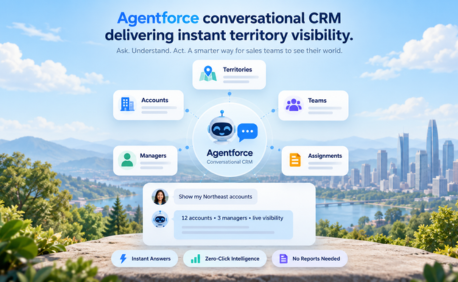
Agentforce conversational CRM is transforming how sales teams improve CRM user adoption, gain instant territory visibility, and increase sales productivity. By using conversational AI in Salesforce, reps can access critical data without manual navigation or complex reporting.

The ROI of your Salesforce investment is directly tied to user adoption. If your CRM feels like a data entry chore rather than a sales tool, your field teams will find workarounds — and your data quality will suffer.

Why CRM Complexity Is the Hidden Enemy of Sales Productivity

Salesforce is the world's most powerful CRM platform. Yet across enterprise deployments, one challenge consistently undermines its return on investment: navigational complexity. When sales reps must click through six to ten screens to answer a basic question about their territory, the CRM stops being a sales enablement tool and starts feeling like an administrative burden.

The consequence is predictable: reps export data to spreadsheets, managers make decisions on stale information, and Sales Operations spends its time fielding support requests instead of driving strategy. Softsquare's Agentforce-powered solution eliminates this friction entirely.

The Three Symptoms of CRM Navigation Fatigue

Enterprise Salesforce deployments with complex Org Unit automations and territory alignments typically surface three interconnected problems:

  1. Navigational Fatigue: Users are 6 to 10 clicks away from basic answers. Questions like "Which accounts belong to this territory?" require manual report runs rather than instant answers.
  1. The Shadow Spreadsheet Problem: Because data is difficult to retrieve in real time, managers export it to Excel. Decisions get made on week-old data. Discrepancies between Salesforce and spreadsheets erode trust in the CRM.
  1. Wasted Selling Time: Every minute a rep spends navigating menus and generating reports is a minute not spent in front of a customer. At scale, this represents thousands of hours of lost selling time per year.

These challenges highlight the growing need for Salesforce territory management AI to simplify access to complex data structures and improve decision-making speed.

How Agentforce Conversational CRM Improves Sales Productivity

Softsquare redefined Salesforce sales productivity by deploying an Internal Employee AI Agent that acts as a natural language interface for the CRM. Users simply ask a question and receive an instant, accurate, role-specific answer.

This is not a generic chatbot. The Agentforce agent understands the context of each user's role, their assigned territory, their permission levels within the org, and the specific data structures of your Salesforce deployment. It delivers answers in a clean, chat-like experience that requires zero training to use.

Instead of running a manual report, a territory manager asks: "Show me all accounts in the Northeast region assigned to my team." The AI returns a formatted list in seconds — respecting sharing rules and permission sets automatically.

Technical Architecture: The Softsquare Approach

Softsquare's implementation goes beyond out-of-the-box Agentforce capabilities to deliver accurate, secure territory intelligence:

  • Agentforce Topics and Actions: Leveraging Agentforce's native out-of-the-box topics and actions ensures high reliability and reduces implementation risk compared to fully custom AI builds.
  • Invocable Apex and Salesforce Flow Extensions: Custom automation extensions enable the AI to perform "deep reads" of backend territory records that standard conversational AI cannot access, ensuring no data gaps in responses.
  • MAG Logic Integration: Custom "Customer Manager" objects with Management Area Grouping (MAG) logic ensure the AI fully respects your organization's custom sharing models and data security architecture.

Tech Stack Overview

  • AI Engine: Agentforce (native topics and actions, extended with custom automation)
  • Custom Automation Layer: Invocable Apex and Salesforce Flow
  • Data Architecture: Custom Customer Manager objects with MAG (Management Area Grouping) logic
  • Security Model: Full compatibility with Salesforce custom sharing rules and permission sets

Who Benefits from Agentforce Territory Intelligence

  • Field Sales Reps: Instant, accurate answers about assigned accounts, territories, and store lists — no clicks, no reports, no waiting.
  • Territory Managers: Real-time visibility into team structure and account assignments, enabling faster coaching and reallocation decisions.
  • Sales Operations: Dramatically reduced support overhead as reps self-serve answers that previously required a support ticket.

Measurable Outcomes: The Business Case for Conversational CRM

Organizations that have adopted Softsquare's Agentforce conversational interface report consistent, measurable improvements:

  • Zero-Click Intelligence: Reps receive formatted account lists and territory summaries in seconds, compared to multi-minute manual navigation.
  • Eliminated Shadow Spreadsheets: With real-time data accessible through natural language, the incentive to export stale data disappears — improving data integrity across the organization.
  • Reclaimed Selling Hours: Eliminating manual navigation and report generation returns significant active selling time to field teams on a weekly basis.

Ready to Transform with AI?

Frequently Asked Questions

What is the difference between Create from Scratch Import, Salesforce List View and Import Salesforce Related List?
Option
Create from Scratch
Import Salesforce List View
Import Salesforce Related List
Description
Start fresh and manually define every element of the configuration.
Automatically pulls fields and filters from an existing Salesforce List View for faster setup.
Imports columns from a related Salesforce object, based on parent-child relationships.
Customization
Full control over columns, filters, actions, and layout.
Customization allowed after importing fields and filters.
Modify and adjust imported columns and details as needed.
Why does my AGrid show "No columns to display"?
This occurs if you forget to add at least one column while creating the configuration. Fix: Always click "Add Column" after filling in the Configuration Details to ensure columns are added.
Can AGrid admin select fields from related parent objects for display in the list view?
Yes, AGrid admin can select fields from the primary object or related parent objects for display in the list view. Currently, AGrid supports up to 5 parent object levels.
What is Inline Edit Support for Parent level?
Inline Edit Support for Parent level refers to the ability for users to edit fields on the first level parent record of a related object directly from the AGrid List View. For example, if a user has a Configuration for Contacts, they can edit fields on the parent Account record directly from the AGrid List View. This feature can save time and improve efficiency for users who need to make quick updates to related records without having to navigate to the parent record's detail page.
Can users reset a grid to its original setup?
Yes! The Enable Quick Reset option allows users to reset changes (grouping, sorting, kanban, column width, text wrap, etc.) and revert to the base configuration.
What types of fields support column filtering in AGrid?
Supported fields include: Text, Picklist, Multi select picklist, Reference (lookup), Number, Date/Datetime, (Some fields like Rich Text, Text Area are not supported for direct column filtering.)
Can I build related lists for objects without direct relationships in AGrid?
Yes, AGrid's Intelligent List feature enables you to build related lists for objects without direct relationships, visualize complex relationships with sibling records, sibling objects, grandchild objects, and unrelated objects.
How do I pass values to Custom Actions in AGrid?
You can pass values to Custom Actions in AGrid using the Value field or the Global Variable field. In the Global Variable field, you can select a value based on the current AGrid List View or the context of the selected object in the configuration.
What is the difference between Create from Scratch Import, Salesforce List View and Import Salesforce Related List?
Option
Create from Scratch
Import Salesforce List View
Import Salesforce Related List
Description
Start fresh and manually define every element of the configuration.
Automatically pulls fields and filters from an existing Salesforce List View for faster setup.
Imports columns from a related Salesforce object, based on parent-child relationships.
Customization
Full control over columns, filters, actions, and layout.
Customization allowed after importing fields and filters.
Modify and adjust imported columns and details as needed.
Why does my AGrid show "No columns to display"?
This occurs if you forget to add at least one column while creating the configuration. Fix: Always click "Add Column" after filling in the Configuration Details to ensure columns are added.
Can AGrid admin select fields from related parent objects for display in the list view?
Yes, AGrid admin can select fields from the primary object or related parent objects for display in the list view. Currently, AGrid supports up to 5 parent object levels.
What is Inline Edit Support for Parent level?
Inline Edit Support for Parent level refers to the ability for users to edit fields on the first level parent record of a related object directly from the AGrid List View. For example, if a user has a Configuration for Contacts, they can edit fields on the parent Account record directly from the AGrid List View. This feature can save time and improve efficiency for users who need to make quick updates to related records without having to navigate to the parent record's detail page.
Can users reset a grid to its original setup?
Yes! The Enable Quick Reset option allows users to reset changes (grouping, sorting, kanban, column width, text wrap, etc.) and revert to the base configuration.
What types of fields support column filtering in AGrid?
Supported fields include: Text, Picklist, Multi select picklist, Reference (lookup), Number, Date/Datetime, (Some fields like Rich Text, Text Area are not supported for direct column filtering.)
Can I build related lists for objects without direct relationships in AGrid?
Yes, AGrid's Intelligent List feature enables you to build related lists for objects without direct relationships, visualize complex relationships with sibling records, sibling objects, grandchild objects, and unrelated objects.
How do I pass values to Custom Actions in AGrid?
You can pass values to Custom Actions in AGrid using the Value field or the Global Variable field. In the Global Variable field, you can select a value based on the current AGrid List View or the context of the selected object in the configuration.

More Insights for you