

Salesforce Headless 360: Run Salesforce Workflows Without Always Logging In


Table of Contents


What if your team could fetch account details, create opportunities, update cases, trigger workflows, and retrieve business insights without opening the Salesforce browser every time?
That is the shift Salesforce Headless 360 is designed to support. It allows Salesforce capabilities to be accessed through APIs, MCP tools, CLI commands, and AI-powered interfaces sobusiness users, developers, and AI agents can interact with Salesforce from different work surfaces.
The goal is not to replace Salesforce. The goal is to make Salesforce easier to access, automate, and act on from the places where work already happens.
What Is Salesforce Headless 360?
Salesforce Headless 360 is an approach where Salesforce data, workflows, and business logic can be accessed beyond the standard Salesforce user interface.
Traditionally, using Salesforce meant logging in, navigating records, opening related lists, updating fields,and saving changes through a browser. That experience still matters, but it is no longer the only way teams can work with Salesforce.
With a headless architecture, Salesforce capabilities can be accessedthrough:
- APIs for programmatic access
- MCP tools for AI agent interaction
- CLI commands for developer and DevOps workflows
- Conversational interfaces for business users
- External tools that connect to Salesforce securely
This allows AI agents, developers, and business tools to interact with Salesforce data and processes directly while humans still guide decisions, approvals, and business judgment.
Why Salesforce Headless 360 Matters for Business Teams
Most companies have years of valuable business context inside Salesforce. Customer records, opportunities,open cases, approval history, renewal dates, SLA status, account relationships,and workflow logic all live inside the platform.
But when that context is only available through manual navigation, work slows down. A sales user may need toopen multiple records before updating an opportunity. A service user may needto check case history before responding. A developer may need to switch between setup, documentation, terminals, and code editors to complete one task.
Salesforce Headless 360 helps reduce this friction by making Salesforce capabilities available where work is already happening.
- Faster access to customer and account data
- Less manual navigation between Salesforce screens
- Easier workflow execution from external tools
- Better support for AI-assisted work
- More consistent use of Salesforce business logic
- Faster movement from request to action
The real value comes from making Salesforce context usable outside the traditional UI while still keeping Salesforce as the system of record.
How Salesforce Headless 360 Works
Salesforce Headless 360 works byexposing Salesforce capabilities through access layers that applications,developers, and AI agents can use.
APIs
Salesforce APIs allow external systems and custom applications to interact with Salesforce records, metadata,and processes. They are useful for integrations, automation, portals, mobile apps, backend services, and enterprise workflows and are the foundation formany Salesforce integrations and automated business processes.
MCP Tools
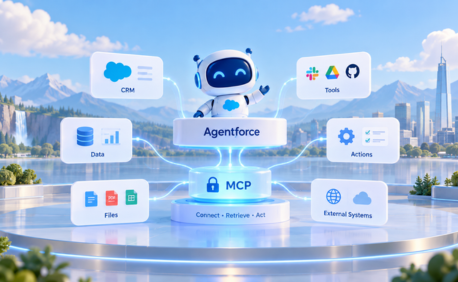
MCP, or Model Context Protocol, gives AI clientsa structured way to discover and call available tools. In the Salesforce context, Salesforce MCP tools can expose Salesforce operations in a way that AI agents can understand and invoke helping AI assistants retrieve records,summarize data, call approved actions, or trigger workflows based on business context.
CLI Commands
Command-line access is useful for developers,architects, and DevOps teams. CLI-based workflows allow teams to retrieve metadata, validate changes, deploy updates, automate release steps, and manage development pipelines more efficiently. When combined with AI-assisted development tools, CLI access can help reduce context switching and speed up Salesforce delivery workflows.
Real-World Experience: What This Can Look Like
A practical example fromSoftsquare's internal exploration shows how this experience can work when an AItool is connected to Salesforce through an MCP server.
Using Claude connected to a Salesforce MCP server, the team was able to:
- Fetch a list of accounts from a live Salesforce org
- Retrieve opportunities related to a specific account
- View opportunity details such as stage, amount, close date, and expected revenue
- Create a new opportunity using a plain-language instruction
- Complete these actions without manually navigating Salesforce screens
The bigger value is context. When the AI assistant connects to the live Salesforce org, it can work with actual records, relationships, and business data instead of generic information changing Salesforce from a place users must always navigate manually into asystem that can be accessed through guided, secure, and context-aware interactions.
Key Business Benefits of Salesforce Headless 360
- Faster Work Execution: Tasks that usually require several clicks can be completed through a single instruction or automated workflow, helping teams reduce time spent on navigation and focus more on decisions.
- Better Use of Salesforce Context: When connected to Salesforce data and workflows,an AI agent can understand the customer record, case status, opportunity history, account ownership, open tasks, and related business rules, supporting real work instead of giving generic answers.
- Work From Any Surface: Salesforce Headless 360 supports a future where users work from the interface that fits their role — chat tools, IDEs, terminals, or conversationalAI assistants while Salesforce remains the system of record.
- Faster Development and Deployment: Developers can use Salesforce capabilities from coding environments,terminals, and AI-assisted development tools, reducing tool switching and making Salesforce development workflows more efficient.
- Stronger Governance andControl: Headless access does not mean uncontrolled access. Any Salesforce MCP integration or AI-assisted workflow should follow the organization's permissions, sharing model, approval rules, and governance policies.
Current Challenge vs. How Salesforce Headless 360 Helps
Who Benefits Most From Salesforce Headless 360
- Sales Teams: Sales teams can retrieve account details, create opportunities, update pipeline information, check renewal timelines, and prepare customer summaries faster, asking for information instead of searching through records manually.
- Service Teams: Service teams can use AI agents to retrieve case details, summarize customer history, check SLA status, update case fields, and trigger escalation workflows spending less time searching and more time resolving customer issues.
- RevOps and Operations Teams: RevOps and operations teams can support reporting, workflow triggers, account updates, pipeline checks, and process automation across systems reducing repetitive operational work and improving consistency.
- Developers and Salesforce Architects: Developers can benefit from CLI and MCP-enabled workflows that support metadata access, deployment planning, testing, and development automation working closer to their coding environment.
- IT and Platform Teams: IT teams can focus on governance, access control, auditability, and responsible AI adoption maintaining clear policieson what agents can read, update, trigger, and escalate.
Considerations Before Getting Started
Salesforce Headless 360 can create significant business value, but it should be implemented carefully.
- Data Quality Matters: AI agents can only act on the data available tothem. Before expanding agent-driven workflows, businesses should review key objects, required fields, data ownership, and process quality.
- Access Controls Must Be Clear: Not every agent should be able to perform every action. Businesses need to define which actions can be completed automatically,which require human approval, and which should remain restricted especially for pricing updates, case escalations, contract changes, and customer data access.
- Start With High-Value Use Cases: The best starting point is one repeatable workflow with clear value. Examples include account and opportunity summaries, follow-up task creation, case status updates, customer history retrieval, and approval workflow triggers.
- MCP Is Still Evolving: MCP is becoming an important standard for AI tool interaction, but businesses should design with flexibility. A practical architecture should support APIs, MCP tools, and developer workflows based onthe use case.
Our Solution: Salesforce MCP and AI Agent Enablement
Softsquare helps businesses evaluate, design,and implement Salesforce MCP and AI agent workflows based on real business needs. We help teams connect Salesforce data, APIs, MCP servers, AI tools, and automation layers so users can work faster without rebuilding existing Salesforce processes.
- Identifying high-value Salesforce headless use cases
- Connecting Salesforce orgs to MCP-compatible AI tools
- Designing AI-assisted workflows for sales, service, operations, and development teams
- Mapping Salesforce permissions, sharing rules, and approval requirements
- Building safe automation patterns for record access and updates
- Supporting API, MCP, and CLI-based Salesforce interactions
- Testing workflows with real Salesforce data and user scenarios
- Helping teams define governance rules before scaling agent access
Why Choose Softsquare for Salesforce Headless 360
Softsquare brings Salesforce implementation experience, product thinking, integration expertise, and AI workflow knowledge together.
We understand that Salesforce Headless 360 is not just a technical setup. It affects how users work, how data is accessed, how approvals happen, and how teams trust AI-driven actions.
Softsquare can help businesses:
- Choose the right first use case
- Design safe agent workflows
- Connect Salesforce with MCP-compatible tools
- Use APIs and CLI patterns where MCP is not the right fit
- Keep user permissions and governance at the center
- Build practical AI-assisted workflows for real teams
- Avoid over-engineered implementations
- Scale from simple retrieval to more advanced automation
This helps businesses adopt Salesforce Headless 360 in a way that is useful, secure, and aligned with existing operations.
Business Use Cases for Salesforce Headless 360
Account and Opportunity Retrieval: A sales manager wants a quick summary of an account and its related opportunities. An AI assistant can retrieve account details, open opportunities, close dates, amounts, and next steps without navigating multiple Salesforce pages.
Business value: Faster account research and better meeting preparation.
Opportunity Creation: Asales rep wants to create a new opportunity after a customer call. Instead of manually opening Salesforce, the rep can describe the opportunity details through a connected assistant.
Business value: Less manual data entry and faster pipeline updates.
Case Updates and Escalations: A service team member wants to update a case, check SLA status, and triggeran escalation if needed. A governed AI agent can retrieve the case, summarize history, update permitted fields, and trigger the right workflow.
Businessvalue: Faster service actions and more consistent escalation handling.
Developer Workflow Support: A Salesforce developer wants to inspect metadata, validate a change, or prepare adeployment. With CLI and MCP-connected workflows, developers can interact with Salesforce from their development environment instead of switching between multiple tools.
Business value: Reduced context switching and faster development workflows.
Executive Summaries: Aleader wants a summary of pipeline, service risk, or customer activity. A connected AI assistant can retrieve relevant Salesforce data and produce a structured summary based on live records.
Business value: Faster access todecision-ready business context.
Key Benefits of Salesforce Headless 360
For Business Users
Business users can complete Salesforce-related work faster without always navigating through records manually. They can retrieve customer context, update records, and trigger workflows from connected tools while still relying on Salesforce as the system of record.
For Developers
Developers can use Salesforce capabilities from coding environments, terminals, and AI-assisted development tools. This can reduce tool switching and make Salesforce development workflows more efficient.
For Operations Teams
Operations teams can automate repetitive Salesforce tasks and improve process consistency across sales, service, and support workflows. They can also connect Salesforce actions with broader business workflows across tools and departments.
For IT Leaders
IT leaders can support AI adoption while maintaining governance, permissions, auditability, and platform control. This makes Salesforce Headless 360 useful not only for productivity, but also for responsible enterprise AI adoption.
Conclusion
Salesforce Headless 360 is more than a new way to access Salesforce. It changes how teams can work with Salesforce data, workflows, and business logic.
Instead of making every user login, navigate records, and complete each step manually, businesses can expose approved Salesforce capabilities through APIs, MCP tools, CLI commands, and AI-powered interfaces. The result is faster work, better access to business context, and more flexible ways for teams and agents to act inside Salesforce.
For businesses exploring Salesforce Headless 360, the right approach is to start with a practical workflow, connect it safely, govern it properly, and expand based on measurable value.
Softsquare can help you identifythe right use cases, connect Salesforce to MCP-compatible tools, and build secure AI-assisted workflows around your existing Salesforce processes.
Ready to connect your Salesforce org with MCP and AI agents? Talkto Softsquare!
Ready to Transform with AI?
Frequently Asked Questions
An approach where Salesforce data, workflows, and business logic are accessed through APIs, MCP tools, CLI commands, and AI-powered interfaces — beyond the standard browser UI — from the surfaces where work already happens.
Capabilities exposed through the Model Context Protocol that let AI agents retrieve records, trigger flows, update permitted fields, and summarize data — all within the organization's approved access controls.
Yes, when implemented correctly. Headless access follows the organization's Salesforce permissions, sharing model, and approval rules. Sensitive operations such as contract changes or escalations require human approval.
Start with one repeatable workflow with clear value — account retrieval, follow-up task creation, or case status updates. Validate governance first, then expand based on measurable results.
Sales teams get faster account research. Service teams get AI-assisted case management. Developers get CLI and MCP-enabled workflows. IT teams gain better governance visibility over agent access.
No. It is additive — headless access layers are built on top of existing screens, flows, and configurations. Existing approval rules, validation logic, and user workflows remain intact.
REST API requires custom code and developer maintenance. Salesforce MCP tools expose governed capabilities in a format AI agents can discover and call — without custom integration code, while keeping the same security controls.
More Insights for you



.png)





Ready to Transform Your Business with Salesforce & AI?
