

How Agentforce Turns Cryptic IT Logs into Instant Resolutions and Cuts Tier-3 Escalations by 60%


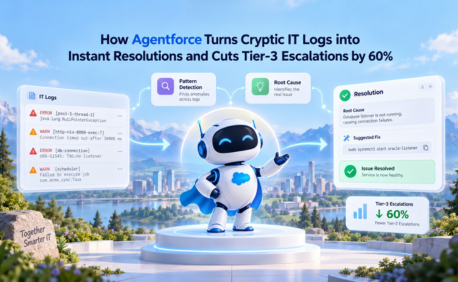
Table of Contents


Agentforce IT support automation is transforming how teams handle Salesforce log analysis, reduce MTTR, and automate IT incident resolution. Using Retrieval-Augmented Generation (RAG), organizations can convert complex Salesforce error logs into instant, actionable insights.
Every minute a field technician is offline due to a sync failure is a minute of lost productivity — and potentially a missed customer commitment. The bottleneck is rarely the fix itself. It's the time it takes to understand the problem.
System Downtime Is a Revenue Problem, Not Just an IT Problem
In modern field service operations, digital synchronization failures cascade quickly. When a technician's mobile app stops syncing, they lose access to work orders, customer history, and service documentation. The clock starts ticking — not just on the IT ticket, but on customer satisfaction scores and service-level agreements.
The traditional IT support process was never designed for speed. And the weakest link in the chain is almost always the same: unstructured, context-free log files that require a developer to interpret.
This is where Salesforce error log AI and modern RAG Salesforce log analysis capabilities become critical for reducing delays in issue identification and resolution.
Why Traditional IT Log Analysis Fails Field Operations
The logs generated by Salesforce mobile app errors and sync failures are inherently difficult to triage. Three structural problems prevent fast resolution:
- Deeply Technical Output: Error logs contain stack traces, SQL query failures, and cryptic exception codes. A Tier-1 support agent reading "Null Pointer Exception at com.salesforce.sync.ObjectManager" has no actionable information.
- Missing Business Context: The same error code can have multiple causes depending on user configuration, sync profile settings, and object permissions. A log alone cannot tell a support agent which situation applies.
- Developer Dependency: Because logs are unstructured and context-free, support teams are forced to escalate nearly every non-trivial ticket to Tier-3 developers. This creates an expensive backlog, slows resolution times, and diverts engineering talent from product development.
The Agentforce Solution: RAG-Powered Incident Triage
Softsquare engineered an Agentforce IT Support Automation system that fundamentally changes how log analysis works. This is not a chatbot that summarizes an error message. It is a context-aware triage engine that uses Retrieval-Augmented Generation (RAG) to reason like a senior developer.
This approach to Agentforce IT support automation leverages Retrieval-Augmented Generation for IT support to deliver faster, more accurate incident triage at scale.
The system combines the raw error log with your organization's internal knowledge base — past incident resolutions, FAQs, configuration documentation, and system PDFs to produce a plain-English diagnosis and a step-by-step resolution plan, automatically.
When an error occurs, the AI does not just read it — it looks up the solution. By connecting the error pattern to your organization's specific resolution history, it delivers the "Recommended Action" in seconds, not hours.
How the RAG Architecture Works
The technical elegance of this solution lies in how it grounds the AI in factual, organization-specific knowledge rather than generic responses:
- Event Log Ingestion: Device Event Logs from Salesforce mobile apps and sync processes are ingested in real time as incidents are reported.
- Knowledge Base Retrieval: The RAG system queries your organization's unstructured knowledge base stored within Salesforce - including PDFs, historical incident resolutions, and FAQ documents, to retrieve the most relevant context for the specific error.
- LLM Synthesis: The Agentforce LLM processes the error alongside the retrieved context, identifies the failure pattern, categorizes the incident type, and generates a specific, actionable resolution recommendation.
This architecture ensures that Salesforce error log AI is grounded in real organizational data, helping teams consistently reduce MTTR in Salesforce support workflows.
- Automated Categorization: Each incident is automatically categorized and routed, enabling Tier-1 agents to resolve issues that previously required escalation.
Tech Stack Overview
- Architecture: Retrieval-Augmented Generation (RAG) grounding AI responses in verified organizational knowledge
- Data Sources: Salesforce Device Event Logs + Unstructured Knowledge Bases (PDFs, FAQs, incident history)
- AI Engine: Agentforce LLMs with pattern recognition and incident categorization
- Integration: Native Salesforce platform — no external data transfers required
Who Benefits from Agentforce IT Support Automation
- Tier-1 Support Teams: Receive plain-English diagnoses and recommended actions, enabling first-call resolution for issues that previously required developer involvement.
- Salesforce Admins: Gain the ability to resolve sync profile and configuration issues independently, without waiting in a developer queue.
- Field Technicians: Return to productivity faster, with fewer extended outage windows disrupting customer-facing work.
- IT Leadership and CIOs: Demonstrate measurable cost reduction in Tier-3 support spend and improved Mean Time to Resolution (MTTR) across the support organization.
Measurable Results: The Case for AI-Driven Log Intelligence
Organizations that have deployed Softsquare's Agentforce IT Support Automation system report significant, quantifiable improvements:
- Up to 60% Reduction in Tier-3 Escalations: Tier-1 agents resolve issues with AI-generated guidance that previously required senior developer involvement — dramatically reducing per-ticket cost.
- Instant Incident Triage: What previously took hours of developer analysis is reduced to seconds. The AI identifies the failure pattern, retrieves the solution, and delivers a resolution recommendation before a developer even opens the ticket.
- Minimized Field Technician Downtime: Faster resolution means technicians return to active service sooner, protecting customer satisfaction scores and field service SLAs.
- Developer Capacity Reclaimed: By eliminating repetitive log analysis from developer workloads, engineering teams redirect their capacity toward building new features and system improvements.
Ready to Transform with AI?
More Insights for you








Ready to Transform Your Business with Salesforce & AI?
