

How to Streamline Field Operations with Salesforce Field Service Management


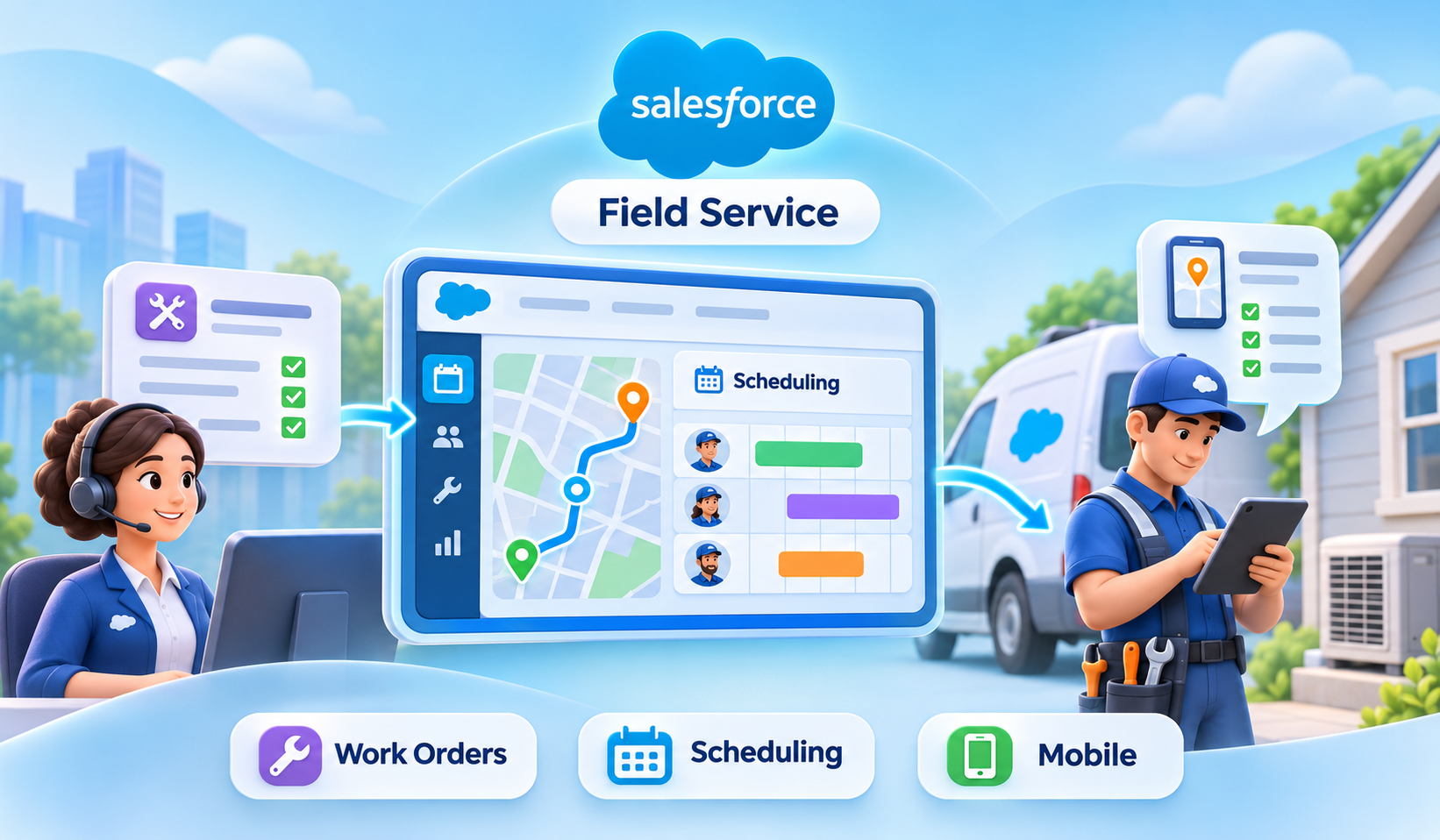
Table of Contents


Field service teams often lose time before a technician even reaches the customer. Scattered schedules, delayed assignments, missing parts, and limited job visibility can slow service and frustrate customers.
Salesforce Field Service Management connects service agents, dispatchers, technicians, and managers in one platform. With work orders, intelligent scheduling, mobile access, and appointment tracking, teams can coordinate each visit more effectively.
The goal is simple: send the right technician, with the right information and resources, at the right time. For businesses evaluating field service management Salesforce solutions, this connected approach can make daily operations far easier to manage, without another layer of manual coordination.
What Is Salesforce Field Service Management?
Salesforce Field Service Management helps businesses plan, assign, and track on-site services such as repairs, installations, maintenance, and inspections. It connects with Service Cloud, allowing customer issues and service history to inform field work.
How Does It Work in Practice?
- A service agent creates a work order with the customer's issue and job requirements.
- A dispatcher schedules an appointment based on skills, availability, territory, and priority.
- A field technician completes the visit using job details and instructions in the mobile app.
- The team tracks progress through appointment updates, service records, and configured notifications.
Behind this workflow are connected work orders, appointments, service resources, territories, and scheduling policies. Sometimes called Salesforce field management or field service Salesforce, it manages more than technician schedules: it supports the service journey from request to completion.
What Are the Key Features of Salesforce Field Service Management?
Work Order Management
Work orders capture the service request, customer asset, job scope, priority, and completion details. Standardized work types and line items help teams handle recurring tasks consistently, from an HVAC inspection to an equipment replacement.
Work Plans and Work Steps
Reusable work plan templates organize recurring jobs into steps, such as an HVAC inspection checklist. Technicians can follow these steps on site, helping teams apply consistent procedures and reduce missed tasks.
Intelligent Scheduling and Dispatching
Scheduling policies consider resource skills, operating hours, territories, travel, and business priorities. Dispatchers can review assignments and respond to disruptions rather than building every schedule manually. The outcome depends on accurate data and properly configured rules.
Mobile Workforce Management
The Field Service mobile app gives technicians access to assigned appointments, instructions, asset history, and service reports. Supported offline workflows help them continue working where connectivity is unreliable, although some functions and data synchronization require a connection.
Service Reports and Digital Job Documentation
Service reports document completed work against work orders or appointments. Technicians can capture repair details and customer signatures using configured templates, creating shareable PDF records and reducing paper-based reporting.
Real-Time Field Operations Tracking
Appointment statuses and technician updates help dispatchers identify delays, completed jobs, and changes requiring action. Live location visibility or customer tracking requires the relevant capabilities and configuration; it should not be assumed to operate automatically.
Inventory and Asset Management
Teams can record parts held in warehouses or service vehicles, request stock, and log products consumed on jobs. Linking equipment history and available parts to work orders reduces surprises when technicians arrive on site.
Preventive Maintenance Management
Maintenance Plans and Maintenance Assets support recurring service schedules. For example, a manufacturer can generate monthly inspection work orders for production equipment using configured rules, keeping preventive work organized and asset histories current.
Service Appointment Management
Service appointments represent the scheduled visit associated with a work order or other supported record. Teams can manage time windows, assigned resources, status changes, and rescheduling while keeping the underlying service request connected.
Customer Appointment Tracking with Appointment Assistant
Appointment Assistant Real-Time Location can give customers temporary tracking of an assigned technician while en route. This helps reduce uncertainty about arrival times. Tracking requires the appropriate licensing, permissions, and setup.
Automated Workflows and Notifications
Salesforce Flow and supported notifications can reduce manual handoffs. For example, a high-priority job can trigger an internal alert, while an appointment status change can start a customer communication process after the required automation is configured.
Agentforce Field Service and Operations
Salesforce now calls its field service offering Agentforce Field Service and Operations. With AI features enabled and licensed, teams can use Agentforce for job context, scheduling assistance, and post-work summaries alongside standard dispatch and mobile workflows.
How Does Salesforce Field Service Management Streamline Field Operations?
The biggest improvement comes from connecting decisions that were previously made in isolation.
Optimizes Technician Scheduling and Resource Allocation
Instead of assigning the nearest available person, a dispatcher can match the job to the right skills, territory, working hours, and urgency. This helps prevent mismatched assignments and unnecessary travel, particularly across multiple service regions.
Reduces Manual Dispatching and Administrative Work
Scheduling rules and repeatable workflows automate routine allocation decisions. Dispatchers spend less time calling technicians or updating spreadsheets and more time resolving exceptions, such as emergency repairs or unexpected absences.
Improves First-Time Fix Rates
A technician who sees previous repairs, asset details, required parts, and job instructions is better prepared. A utility maintenance team, for example, can verify a replacement component before dispatch instead of discovering the shortage at the customer's site.
Enables Real-Time Communication and Collaboration
Status updates recorded in the mobile app can help office teams coordinate the next action. When a repair needs specialist support, shared job context reduces repetitive explanations. Offline changes synchronize after connectivity returns, rather than appearing instantly.
Enhances Customer Experience and Service Visibility
Clear appointment windows and timely updates reduce uncertainty. If a visit must be rescheduled, connected service records help agents explain the change without making customers repeat their issue. Optional appointment-tracking features can add visibility where appropriate.
Improves Operational Visibility and Decision-Making
Managers can use reports to identify backlog, travel inefficiencies, repeat visits, and uneven technician utilization. Reviewing these trends alongside service quality prevents teams from maximizing job volume at the expense of customer outcomes.
How to Implement Salesforce Field Service Management for Your Business
A successful rollout starts with operational design, not the scheduling engine. Use these seven steps as a practical implementation sequence.
Step 1: Assess Existing Field Service Operations
Map how requests enter the business, who approves jobs, how dispatchers allocate work, and where technicians record results. Document recurring delays, missing parts, manual handoffs, and disconnected systems. Interview field workers as well as office teams.
Step 2: Define Business Requirements and Implementation Goals
Choose measurable outcomes before configuration: appointment punctuality, first-time fix rate, jobs per technician, travel time, or time to resolution. Define a baseline, a target, and who owns each metric. Separate essential workflows from later enhancements.
Step 3: Configure Work Orders and Service Processes
Design consistent work order types, statuses, priorities, and appointment relationships. Capture skills, parts, service locations, and customer asset details in fields that support scheduling. Avoid creating unnecessary custom objects when standard Field Service records meet the requirement.
Step 4: Set Up Scheduling and Dispatching
Configure service territories, operating hours, resource memberships, skills, absences, and scheduling policies. Test priority conflicts and emergency jobs. Salesforce recommends clear territory structures and accurate skill requirements so scheduling decisions reflect real-world constraints.
Step 5: Integrate Salesforce Field Service with Existing Systems
Connect Service Cloud, ERP, inventory, or asset systems where needed. Decide which system owns each field, how changes synchronize, and what happens when an integration fails. Data governance matters as much as the connector itself.
Step 6: Enable Mobile Access for Field Technicians
Configure mobile layouts, permissions, work instructions, and service reports around actual job tasks. Test offline access, attachments, and synchronization in low-connectivity environments. Salesforce notes that the mobile Inventory tab is not available offline, so plan parts workflows accordingly.
Step 7: Test, Deploy, and Optimize Field Service Operations
Run realistic scenarios: cancellations, absent technicians, urgent jobs, missing stock, and poor connectivity. Pilot with a small team, train dispatchers and technicians, then expand gradually. Compare performance against the original baseline and refine scheduling policies.
What Are the Benefits of Salesforce Field Service Management?
- Increased Technician Productivity: Technicians spend less time searching for job details and more time completing assigned work. Mobile forms also reduce end-of-day paperwork.
- Reduced Operational Costs: etter scheduling can limit avoidable travel, repeat visits, and administrative effort. Savings depend on utilization, geography, and process adoption.
- Faster Service Delivery and Response Times: Dispatchers can prioritize urgent work and identify available qualified resources sooner, improving responsiveness during peak demand.
- Improved First-Time Fix Rates: Access to accurate service history and parts information helps teams prepare properly, although the result still depends on diagnostic quality.
- Enhanced Customer Satisfaction: Customers benefit from clearer appointment expectations, fewer repeated explanations, and more consistent follow-through after the visit.
- Better Resource and Workforce Utilization: Managers can balance workloads across territories without ignoring technician skills, working hours, or service-level commitments.
- Greater Visibility into Field Service Performance: Shared records make it easier to measure completion rates, repeat visits, appointment adherence, and exceptions over time.
What Are the Challenges in Managing Field Service Operations Without Automation?
Manual operations often create a chain reaction. An urgent call arrives, but the dispatcher cannot see technician availability. A spreadsheet assignment reaches the wrong worker. The technician travels without the correct part, and the customer has to book another visit. Meanwhile, managers only discover the delay after a complaint.
Disconnected tools also fragment asset history, inventory counts, and productivity reporting. Teams spend time reconciling versions rather than solving service problems. Field service management for Salesforce addresses these gaps by connecting work orders, workforce schedules, mobile updates, and customer context. Automation improves coordination, but reliable data and clear ownership remain essential.
Salesforce Field Service Management vs. Traditional Field Service Management
A digital platform improves consistency, but implementation quality determines whether the potential benefits are realized.
Best Practices for Optimizing Salesforce Field Service Management
Salesforce's scheduling guidance and mobile documentation reinforce several practical habits:
- Keep service territories and scheduling policies realistic. Validate operating hours, travel assumptions, priorities, and exceptions with dispatchers.
- Maintain trustworthy resource data. Review certifications, skills, absences, and territory memberships whenever staffing changes.
- Standardize repeatable work. Use work types and clear completion criteria, while allowing exceptions for complex jobs.
- Connect asset, customer, and inventory records. Confirm part availability before appointments that depend on specialized equipment.
- Design for mobile realities. Keep layouts focused and test sync behavior before promising offline capability for a process.
- Monitor useful KPIs. Track first-time fix rate, schedule adherence, travel time, technician utilization, and repeat visits together.
- Review and improve regularly. Gather feedback from field teams and adjust rules before adding more automation.
Conclusion
Salesforce Field Service Management helps replace fragmented field processes with a more coordinated service operation. Work orders preserve context, scheduling policies guide assignments, and mobile workflows keep technicians connected to the job. When combined with accurate inventory data and meaningful performance measures, these capabilities can support faster resolution and a better customer experience.
The strongest results come from aligning the technology with the way your teams actually work. Softsquare can help assess your current process, design the right Salesforce Field Service implementation, and optimize it as your operations grow. Contact Softsquare to discuss your field service goals.
Ready to Transform with AI?
Frequently Asked Questions
It is the use of Salesforce Field Service to coordinate on-site work, including work orders, scheduling, dispatching, technician activity, and service appointments.
A service request becomes a work order and appointment. Scheduling assigns a qualified resource, the technician completes the job, and updates flow back into service records.
It provides job information on mobile devices and reduces repetitive coordination, helping technicians prepare for visits and complete reports more efficiently.
Work orders, intelligent scheduling, dispatching, mobile workflows, appointment tracking, inventory and asset records, and configurable automation.
Scheduling policies consider skills, availability, territories, and business priorities. Dispatchers can review and adjust assignments when conditions change.
Yes. The two operate on the Salesforce platform, allowing customer-service teams and field teams to share relevant cases, work orders, and service context.
Costs depend on license types, user counts, integration complexity, data readiness, customization, and training. Review Salesforce's current pricing and scope implementation separately.
More Insights for you

























Ready to Transform Your Business with Salesforce & AI?
