

Salesforce License Types: Features, Pricing & User Access


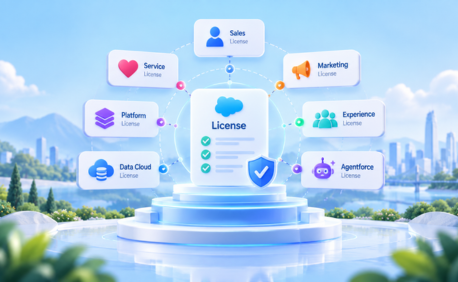
Table of Contents


A Salesforce license determines the level of functionality and access available to a user. Choosing the right license matters because not every employee, system, customer, or partner needs the same Salesforce capabilities.
Right-sized licensing can help businesses control costs, maintain appropriate access, and avoid paying for functionality users do not need.
Salesforce licensing can include user licenses, Platform licenses, feature and permission set licenses, Experience Cloud licenses, integration licenses, and AI-related options such as Agentforce.
This guide explains the major Salesforce license types, how they differ, pricing considerations, and which options may suit different users.
What Is a Salesforce License?
A Salesforce license defines the baseline functionality available to a user. Every Salesforce user has a user license, while additional capabilities may be provided through feature licenses, permission set licenses, profiles, and permission sets.
A simple way to view the relationship is: Edition → User License → Profile / Permission Sets
A user has one user license but can have multiple applicable feature or permission set licenses.
Salesforce Editions vs. License Types
Salesforce editions and licenses are often confused.
An edition defines the broader functionality available with a Salesforce product. Current Sales offerings, for example, include Free Suite, Starter Suite, Pro Suite, Enterprise, Unlimited, and Agentforce 1 Sales.
A license controls the baseline functionality available to an individual user.
This means users in the same Salesforce environment may have different license types depending on their responsibilities. A sales representative may need full CRM functionality, while an operations employee may only need access to custom applications.
Types of Salesforce Licenses
Here is a quick overview of the main license categories businesses may encounter.
Salesforce User License
A standard Salesforce user license is intended for employees who need broad access to Salesforce CRM functionality. Typical users include sales, service, marketing, administrative, and other business teams working with core Salesforce applications and data.
Before assigning full Salesforce licenses, organizations should verify whether each user actually requires that level of CRM access.
Salesforce Platform License
Salesforce Platform licenses are designed for internal users who mainly work with custom Salesforce applications rather than core CRM functionality. The brief distinguishes Platform Starter and Platform Plus, with Platform Plus supporting a larger number of custom objects.
Platform licenses can be suitable for internal operations, approvals, workflow applications, and other custom business processes where users do not need full CRM access.
Identity License
Identity-focused licenses support authentication and identity use cases where broad Salesforce CRM access is unnecessary.
Common scenarios include:
- Single sign-on
- Connected application access
- Employee identity management
- Limited external identity use cases
This can help avoid assigning broader Salesforce licenses to users whose primary requirement is authentication.
Salesforce Integration User License
Salesforce Integration user licenses are intended for API-based system integrations. Instead of using an employee’s Salesforce credentials for middleware, ERP, data warehouse, or other integrations, organizations can use dedicated integration users with only the permissions required by the connected system.
This also supports cleaner security and easier integration management.
Feature Licenses
Feature licenses add specific functionality to a user’s existing Salesforce access. Examples can include capabilities associated with areas such as Service Cloud, Knowledge, Marketing, Flow, or Salesforce content features.
A feature license does not replace the user’s base license. It extends the functionality available to that user.
Permission Set Licenses
A Permission Set License (PSL) provides entitlement to additional licensed functionality beyond the user’s base license.
It is different from a permission set:
- Permission Set License: Makes additional licensed functionality available.
- Permission Set: Grants the user specific permissions within the functionality they are entitled to use.
One user may have multiple applicable permission set licenses.
Chatter Free / Chatter Only Licenses
Chatter licenses are designed primarily for collaboration rather than full CRM access. They can be useful for users who need to collaborate, follow updates, or participate in Salesforce-based conversations without requiring broader CRM functionality.
Organizations should evaluate these options where collaboration is the main requirement.
Experience Cloud Licenses
Experience Cloud licenses are intended for external users such as:
- Customers
- Partners
- Resellers
- Distributors
- Other external stakeholders
Different Experience Cloud license types provide different levels of access. Licensing may also be based on members or logins.
Member-based licensing can suit frequent users, while login-based models may suit larger groups that access Salesforce less frequently.
Salesforce Einstein / Agentforce & AI Licenses
AI licensing is becoming an increasingly important part of Salesforce licensing. Agentforce can introduce user-based and consumption-based pricing in addition to traditional Salesforce licenses. Organizations may need to consider both who requires AI functionality and how frequently agents or AI-powered processes will run.
This is especially important for customer-facing agents or high-volume automated use cases, where consumption can affect overall cost.
Marketing Cloud & Account Engagement Licenses
Marketing Cloud Account Engagement, formerly Pardot, follows a different model from standard Salesforce user licensing. Its editions are typically purchased at the organization level rather than simply assigning a separate license to every CRM user.
Organizations evaluating Salesforce costs should therefore remember that not every Salesforce product follows a per-user pricing model.
Data Cloud Licenses
Data Cloud, now referred to as Data 360 in Salesforce’s current positioning, also differs from traditional seat-based licensing. Pricing can depend on data usage, profiles, processing, and consumption rather than only the number of employees using Salesforce.
Businesses evaluating Data Cloud should therefore estimate expected data workloads alongside their user-license requirements.
Developer License
There is no separate license required for Developer. Salesforce offers Developer Edition (free environment) for learning, development, experimentation, and prototyping. It can be used to explore configuration, Apex, APIs, and Lightning development.
Developer Edition is intended for development purposes and should not be treated as a substitute for a licensed production Salesforce environment.
Salesforce User License vs. Feature License vs. Permission Set License
These license concepts serve different purposes:
The key rule is simple: a user has one base user license but may have multiple applicable feature and permission set licenses.
Internal vs. External Salesforce Licenses
Salesforce licensing can also be categorized by who needs access.
Salesforce pricing can therefore use several models, including per user, per member, per login, per organization, and consumption-based pricing.
Which Salesforce License Do You Need?
The right license depends on what the user or system needs to do.
- Sales rep managing leads and opportunities: Full Salesforce CRM license
- Operations employee using custom applications: Salesforce Platform
- Employee primarily needing SSO: Identity
- ERP or middleware integration: Salesforce Integration
- Customer self-service: Experience Cloud customer license
- Partner or reseller access: Experience Cloud partner license
- AI-enabled employee or workflow: Appropriate Agentforce option
- Learning or prototyping: Developer Edition
The objective is not simply to select the cheapest option. It is to choose the license that provides the required functionality without unnecessary access or cost.
Salesforce License Pricing (2026)
Salesforce pricing varies by product and licensing model. For reference, the revised pricing draft includes the following publicly listed Sales pricing as of August 11, 2026:
These should be treated as public list prices, not guaranteed contract prices. Final pricing can differ based on products purchased, quantities, contract structure, add-ons, support, and commercial terms agreed directly with Salesforce.
Businesses should also consider implementation, integrations, administration, support, and additional Salesforce products when estimating total Salesforce costs.
Pricing note: Prices in this article are based on publicly available Salesforce information as of August 2026. Salesforce may change pricing, packaging, and features. Confirm current pricing directly with Salesforce before making a purchasing decision.
How to Check Which Salesforce Licenses Your Org Is Using
Salesforce administrators can start by navigating to: Setup → Company Information
This provides visibility into available and assigned Salesforce licenses. Administrators should also review permission set licenses, feature licenses, active users, and whether each user still requires their current level of access.
For larger organizations, manual license reviews can become time-consuming as users, products, and permission assignments increase.
Common Salesforce License Mistakes
Common licensing issues include:
- Over-licensing: Giving full CRM licenses to users who may only need Platform access
- Unused licenses: Keeping licenses allocated to inactive or unnecessary users
- Ignoring Identity options: Using broader licenses for SSO-only requirements
- Incorrect Experience Cloud licensing: Choosing a member or login model that does not match usage
- Focusing only on user licenses: Overlooking feature licenses, permission set licenses, AI consumption, and add-ons
Regular license reviews can help keep access aligned with actual business requirements.
How Softsquare Helps Businesses Optimize Salesforce Licensing
As Salesforce environments grow, managing users, licenses, permission sets, integrations, and external access becomes more complex.
Through Salesforce Consulting Services and Fractional Admin Support & Managed Services, Softsquare can help organizations review current access, identify underused licenses, and align licensing with how teams actually use Salesforce.
For larger environments, User 360 can also help streamline user lifecycle and license-management processes, providing better visibility into assignments and usage.
Conclusion
Salesforce licensing goes beyond choosing between editions such as Enterprise or Unlimited. Organizations may need to manage full Salesforce users, Platform users, integrations, external users, feature licenses, permission set licenses, AI consumption, and other Salesforce products at the same time.
The best approach is to identify what each user or system actually needs and select the license that provides the required functionality without unnecessary cost. Right-sized licensing can help businesses improve access governance, control costs, and build a Salesforce environment that can scale with changing requirements.
Disclaimer: Pricing information is based on publicly available Salesforce information as of August 2026 and may change. Confirm current pricing and commercial terms directly with Salesforce.
Salesforce and other Salesforce product names referenced herein are trademarks of Salesforce, Inc. Softsquare is an independent Salesforce partner.
Ready to Transform with AI?
Frequently Asked Questions
A Salesforce license determines the baseline functionality available to a user. Additional capabilities may be added through feature licenses, permission set licenses, and permission sets.
An edition defines the broader functionality available to the organization, while a user license determines the baseline access available to an individual user.
A user license provides baseline access. A feature license adds a specific capability to an eligible user.
A user has one base user license but can have multiple applicable feature and permission set licenses.
Internal licenses are primarily for employees and systems, while external licenses support customers, partners, and other users accessing Salesforce externally.
It is primarily used for employees who need custom Salesforce applications and Platform functionality without requiring full CRM access.
Purchased license capacity remains part of the organization’s Salesforce agreement until commercial terms are changed. Regular utilization reviews can help identify unnecessary or underused licenses.
More Insights for you



.png)




Ready to Transform Your Business with Salesforce & AI?
