

How AI Gives Salesforce ISVs a Complete Customer View in One Conversation


Table of Contents


A customer’s renewal is four weeks away.
The account manager opens Salesforce and reviews the account. The contract is active, the renewal opportunity is progressing, and there are no major support issues.
Everything appears healthy.
But one critical question remains unanswered: Is the customer actually using the product?
For many Salesforce ISVs, answering that question requires opening another system, identifying the customer’s Salesforce Org ID, running usage queries, reviewing spreadsheets, and manually comparing the results with CRM data.
By the time the analysis is complete, the account manager may have already spent 20 minutes researching a single customer.
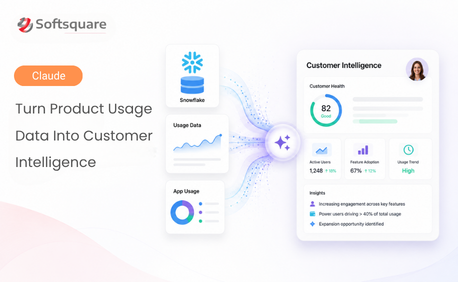
At Softsquare, we addressed this challenge by connecting Claude AI to Salesforce CRM and Snowflake AppAnalytics through Model Context Protocol, or MCP.
The result is a conversational customer-intelligence experience that brings commercial history and product adoption together in seconds.
The Customer Intelligence Gap for Salesforce ISVs
Most AppExchange publishers already have the information they need to understand customer health.
The problem is that the information is divided across different systems.
Salesforce CRM shows the customer relationship
Salesforce typically contains:
- Account and contact information
- Opportunity and renewal history
- Contract values and dates
- Billing details
- Support and engagement information
- Customer ownership and account notes
This tells the account manager who the customer is and what they purchased.
Snowflake AppAnalytics shows product behaviour
AppAnalytics usage data can help ISVs understand:
- How frequently customers use the product
- Which product features are being adopted
- Whether usage is increasing or declining
- Which Salesforce orgs are active
- How production and sandbox activity differs
- When the customer last interacted with the product
This tells the account manager what the customer is actually doing with the product.
Each system provides valuable information. However, neither presents the complete customer story on its own.
Why Separate CRM and Usage Data Creates Risk
Consider a customer with a 50-seat licence.
Salesforce shows:
- Three years as a customer
- Two successful renewals
- No open critical support cases
- An active renewal opportunity
Based only on the CRM record, the account may appear healthy.
However, the usage data may reveal that:
- Product activity has fallen significantly
- Only a small number of licensed users remain active
- Important features have never been adopted
- Production usage stopped several weeks ago
Without access to these signals, the customer success team may not recognise the risk until the customer decides not to renew.
The same gap can also hide expansion opportunities.
A customer may be using the product heavily across multiple business teams but still have a limited licence count. Without usage visibility, the account manager may never identify the opportunity.
The challenge is therefore not a lack of data. It is the effort required to connect the data and make it usable during everyday customer conversations.
Connecting Salesforce, Snowflake and Claude with MCP
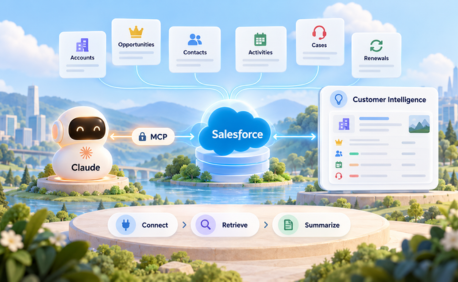
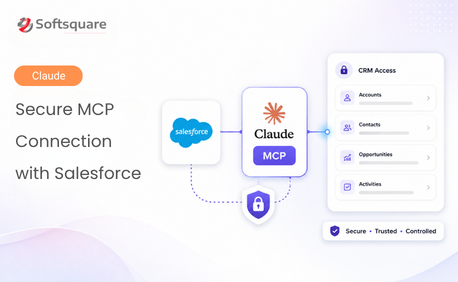
Softsquare uses MCP to give Claude controlled access to tools that retrieve information from Salesforce and Snowflake.
Instead of navigating through multiple applications, the account manager can ask a question in natural language, such as:
Give me a complete customer-health summary for this account, including renewal history, license details, product usage, adoption trends and potential risks.
Claude then uses the connected tools to retrieve the relevant records, analyse the results and present a consolidated response.
The interaction follows three main steps.
Step 1: Retrieve the Customer’s Salesforce CRM Information
Claude first retrieves the relevant Salesforce account information.
Depending on the question and the user’s permissions, this can include:
- Account name and customer status
- Billing location
- Primary business and technical contacts
- Opportunity and renewal history
- Current contract or renewal value
- Renewal stage and expected close date
- License count
- Customer lifetime value
- Recent activities or support context
The response can be organised into a concise customer summary instead of forcing the account manager to open individual records and related lists.
Example CRM summary
The table below shows the Salesforce CRM context Claude can summarize before a renewal conversation.
This gives the commercial and relationship context required for the renewal conversation.
Step 2: Analyse Product Usage in Snowflake
Claude then queries the customer’s AppAnalytics data in Snowflake.
The customer can be matched using a shared identifier such as the subscriber’s Salesforce Org ID.
The analysis can include:
- Total product operations
- Number of active usage days
- Last recorded activity
- Features currently in use
- Recently adopted features
- Usage by production and sandbox org
- Monthly or weekly activity trends
- Significant increases or decreases in usage
Example usage summary
The table below shows the key Snowflake usage metrics Claude can explain in plain English.
Claude can also summarise feature-level adoption.
The table below shows how Claude can break down product adoption by feature.
The individual numbers are useful, but the pattern behind them is more important.
For example, Claude may identify that product activity declined during one period but later recovered and remained consistently strong for several months.
That observation gives the account manager a better question to ask: We noticed that activity decreased earlier in the year and has since recovered. Did anything change in your rollout or internal adoption during that period?
This turns usage data into a meaningful customer conversation.
Step 3: Generate a Combined Customer-Health View
After retrieving both datasets, Claude combines the information into a single customer-health summary.
The final response can include:
- CRM and usage information side by side
- Renewal status and customer tenure
- Product adoption indicators
- Feature-level activity
- Production and sandbox usage
- Usage trends
- Possible risk signals
- Expansion opportunities
- Recommended questions or next actions
Example AI-generated insight
This customer has maintained active product usage for more than 750 days and currently uses 13 features across production and sandbox environments. Usage declined temporarily but has recovered during the last six months. The recent adoption of Chart View suggests continued product exploration. The account appears well adopted, although the earlier decline should be discussed during the renewal conversation.
The purpose of the insight is not to let AI make the renewal decision.
It is to give the account manager the context needed to prepare a better conversation.
From Manual Research to One Conversation
Without this connected workflow, customer preparation may involve:
- Opening the Salesforce account.
- Reviewing contacts and related opportunities.
- Finding the subscriber Org ID.
- Opening Snowflake or requesting an analytics report.
- Running or reviewing usage queries.
- Comparing CRM and usage information.
- Preparing a customer summary.
With AI connected to both systems, the account manager asks one question and receives a structured answer.
What This Changes for ISV Teams
Account Management
Account managers can enter renewal calls knowing:
- Whether the customer is actively using the product
- Which features are important to them
- Whether usage is growing or declining
- Which contacts and opportunities are involved
- What questions should be raised during the conversation
This supports more relevant renewal and pricing discussions.
Customer Success
Customer success teams can identify accounts that require attention before the renewal stage.
Potential signals can include:
- Sustained usage decline
- Long periods without production activity
- Limited feature adoption
- Activity concentrated in sandboxes
- Low usage compared with the purchased licence count
These signals can be used to prioritise enablement, adoption campaigns and customer outreach.
Product Management
Aggregated usage patterns help product teams understand:
- Which features drive regular engagement
- Which features are rarely adopted
- How long adoption takes after installation
- Whether new releases influence product usage
- Which customer segments use advanced capabilities
This provides practical input for product planning and customer education.
Revenue Operations
Revenue teams gain a more consistent way to evaluate renewal and expansion opportunities.
Instead of relying only on opportunity stage or account-manager judgement, the team can also consider real product engagement.
Key Business Benefits
- A more complete customer picture: Commercial data and usage behaviour are presented together instead of being analysed separately.
- Earlier visibility into churn risk: A sustained reduction in product activity can be investigated before the renewal decision is final.
- Better renewal conversations: Account managers can discuss the features and workflows the customer actually uses.
- Stronger expansion signals: High usage, multiple active orgs or growing feature adoption may indicate opportunities for additional licences, services or product capabilities.
- Consistent account preparation: Every account manager can work from a similar customer-health structure rather than creating summaries manually.
- Easier access to analytics: Business users can request information in plain English without learning SQL or navigating Snowflake directly.
- Security and Governance Considerations: Connecting AI to CRM and usage information must be implemented with appropriate controls.
A production implementation should include:
- OAuth-based authentication
- Role-based access
- Least-privilege permissions
- Read-only tools where updates are not required
- Salesforce sharing, CRUD and field-level security enforcement
- Restricted access to approved Snowflake databases, schemas and tables
- Clear MCP tool names and descriptions
- Audit logging
- Validation of customer and Org ID matching
- Protection of personally identifiable and commercially sensitive information
AI should only be able to retrieve information that the authenticated user is authorised to access.
It is also important to separate factual data from AI-generated interpretation. Metrics such as usage counts and renewal dates come from source systems. Health classifications and recommended actions are analytical outputs that should be reviewed by the responsible team.
Why This Matters for AppExchange Publishers
AppExchange publishers often invest heavily in capturing product telemetry but still struggle to make it accessible to customer-facing teams.
Dashboards can help, but they usually require users to know:
- Which report to open
- Which filters to apply
- Which customer identifier to use
- How to interpret the results
- How to connect the metrics with CRM history
A conversational interface changes the way teams access this information.
Instead of asking, “Where is the usage dashboard?”, the account manager can ask:
- Which customers have renewals in the next 90 days and declining usage?
- Which features does this customer use most frequently?
- Is the customer active in production or only in sandboxes?
- Which accounts adopted the latest feature?
- Which high-usage customers may be ready for expansion?
- What changed in this customer’s usage during the last six months?
The AI handles the retrieval and organisation while the team focuses on the customer decision.
How Softsquare Can Help?
Softsquare has implemented this customer-intelligence approach using Salesforce, Snowflake AppAnalytics, Claude AI and MCP.
We can help Salesforce ISVs with:
- Connecting Claude to Salesforce through MCP
- Configuring secure access to Snowflake
- Exposing approved AppAnalytics queries as MCP tools
- Mapping Salesforce accounts to subscriber Org IDs
- Designing customer-health metrics
- Creating prompts for renewal and customer-success workflows
- Implementing role-based security and governance
- Training business teams to use the solution effectively
The implementation can be adapted to the ISV’s product model, customer lifecycle and customer-success process.
Conclusion
A healthy-looking CRM record does not always mean a healthy customer.
The contract may be active, the opportunity may be progressing and the account may have no open escalations. But without product usage information, the customer picture remains incomplete.
By connecting Salesforce CRM and Snowflake AppAnalytics through Claude and MCP, Salesforce ISVs can bring commercial context and product adoption into one conversation.
Account managers prepare faster. Customer success teams identify risks earlier. Product teams gain clearer adoption insights. Revenue teams enter renewal discussions with better information.
The value is not simply that AI can retrieve data from two systems.
The value is that the people responsible for customer relationships can finally access the complete customer story when they need it.
Ready to understand your AppExchange customers beyond the CRM record?
Book a demo with Softsquare and see how Salesforce and Snowflake customer intelligence can work together.
Ready to Transform with AI?
Frequently Asked Questions
No. Account managers and customer success users can ask questions in natural language. The MCP tools and underlying services handle the approved Salesforce and Snowflake queries.
It should not. Access must be restricted through OAuth, roles, permissions and carefully defined tools. Users should only receive information they are authorised to view.
It can identify usage patterns that may indicate risk, such as sustained declines or inactivity. These signals should support customer-success decisions rather than be treated as guaranteed predictions.
Yes. Strong usage, broad feature adoption, increasing activity or multiple active environments may provide useful expansion signals. These should be combined with commercial and customer context.
No. Smaller ISVs may benefit just as much because customer research is often handled manually by a limited team. The workflow can reduce preparation effort regardless of subscriber count.
Yes. With the appropriate tools and permissions, teams can ask questions across multiple subscribers, such as identifying upcoming renewals with declining usage or customers that recently adopted a new feature.
MCP provides a controlled way for Claude to access approved tools that retrieve Salesforce CRM information and Snowflake AppAnalytics data. Claude can then combine the retrieved information into a single customer-health view without requiring users to manually navigate between systems.
More Insights for you







Ready to Transform Your Business with Salesforce & AI?
