

Agentforce Chatbot Support for Auto Insurance Claims


.svg)
Table of Contents


The Need for AI in Auto Insurance Claims
Filing an auto insurance claim is rarely a smooth process. Long wait times, unclear coverage details, and complex paperwork often make an already stressful situation even more frustrating for policyholders.
For insurance providers, the story isn’t any better. High call volumes, repetitive queries, and manual claim verification processes increase operational costs and lower customer satisfaction (CSAT).
Despite advancements in customer service, traditional claim processing methods are slow, inefficient, and outdated. Many insurers have deployed basic chatbots, but they often provide scripted, impersonal responses that fail to resolve real issues.
This is where Agentforce Insurance Claim Chatbot come in. By combining intelligent automation, real-time data processing, and natural language understanding, Agentforce revolutionizes auto insurance claims—ensuring faster resolutions, lower costs, and higher customer satisfaction.
The Challenges of Traditional Auto Insurance Claims
For Policyholders: A Slow and Frustrating Process
- Long Wait Times – Customer service lines are overwhelmed, delaying claim processing.
- Lack of Transparency – Many policyholders only learn about exclusions after filing claims.
- Complex Paperwork – Manual form submissions lead to errors and delays.
- Inconsistent Information – Different agents provide conflicting answers.
- Limited Availability – Support is restricted to business hours, leaving urgent queries unresolved.
For Insurance Providers: A Costly and Inefficient System
- High Operational Costs – Handling thousands of calls and emails daily requires large support teams.
- Low CSAT Scores – Frustrated customers are less likely to renew policies.
- Repetitive Queries – Agents spend valuable time answering the same policy questions.
- Ineffective Chatbots – Many existing bots lack personalization, resulting in low call deflection rates.
With traditional methods, insurance claims are delayed due to high call volumes and manual processing. The Agentforce Insurance Claim Chatbot helps insurers manage claims efficiently while enhancing customer satisfaction.
Agentforce: AI-Driven Auto Insurance Claims Support
Agentforce is a next-generation AI chatbot designed for auto insurers, providing real-time, intelligent, and personalized claim support. Unlike traditional chatbots, Agentforce understands context, processes claims efficiently and enhances customer experience—all while reducing operational costs for insurers.
How Agentforce Transforms Insurance Claims
- Instant Claim Filing – Collects policy details, accident specifics, and required documents automatically.
- Real-Time Claim Tracking – Allows policyholders to check claim status anytime.
- Policy Coverage Insights – Instantly clarifies inclusions, exclusions, and deductible amounts.
- 24/7 Availability – Supports customers anytime, eliminating reliance on business hours.
- Automated Documentation Guidance – Helps users submit correct forms, reducing rejections.
- Omnichannel Support – Works across web, mobile apps, and Salesforce Community Pages.
How Agentforce Works: The Technology Behind It
Data Sources & Inputs
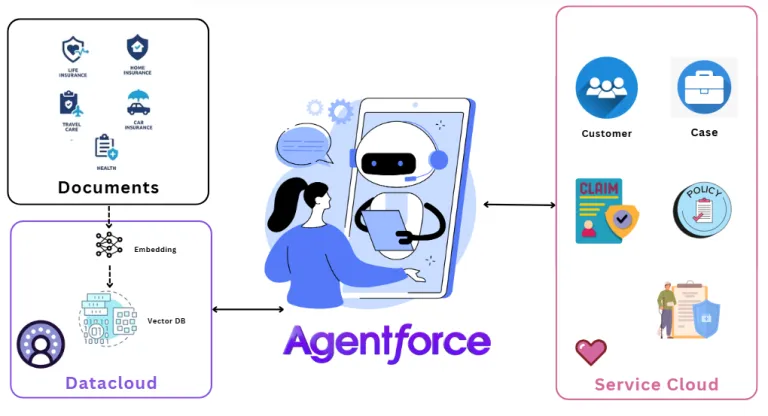
- Salesforce Data Cloud – Securely stores policyholder and claim information.
- CRM Claims Objects – Ensures real-time data synchronization for accuracy.
- User Interaction Logs – Enhances personalization by learning from past queries.
Data Processing & AI Engine
- Natural Language Processing (NLP): Understands intent and responds contextually.
- Real-Time API Integrations: Connects with third-party insurance platforms for seamless claim processing.
- Smart Document Parsing: Reads emails, PDFs, and attachments to auto-extract claim data.
Who Benefits from Agentforce?
- Policyholders: Get instant support and faster claim resolutions.
- Insurance Agents: Automates repetitive queries, freeing time for complex cases.
- Customer Support Teams: Reduces workload, increasing efficiency.
Supported Formats & Platforms
- Web & Mobile Chatbot Interfaces
- Salesforce Community Pages
- Voice AI Integrations
Why Insurers Need AI-Powered Claims Automation
For Policyholders: A Faster, Hassle-Free Experience
- No More Long Waits – Get instant claim support, anytime.
- Clear Policy Information – Understand exactly what’s covered without calling an agent.
- Error-Free Submissions – AI ensures complete and correct documentation.
- Convenience at Its Best – File and track claims from anywhere, on any device.
For Auto Insurance Providers: More Efficiency, Less Cost
- Reduced Call Center Load – Automating queries cuts down on unnecessary human intervention.
- Lower Operational Costs – Handles high claim volumes without increasing support staff.
- Higher CSAT & Retention – Faster, smoother claim experiences lead to happier customers.
- Scalable AI Solution – Expands as your business grows, without adding complexity.
By integrating the Agentforce Insurance Claim Chatbot, insurers can automate customer interactions, improve claim resolution times, and reduce costs
The Future of Auto Insurance is AI-Powered
The auto insurance industry is evolving. Policyholders expect fast, transparent, and digital-first claim processes—and insurers who fail to adapt will lose out to competitors.
With Agentforce AI-powered automation, insurers can redefine the claims experience, boost efficiency, and stay ahead of the industry curve.
Ready to transform your insurance claims process? The future is AI—don’t get left behind!
Ready to Transform with AI?
Frequently Asked Questions
AI-powered claims automation uses AI and workflow automation to streamline activities such as first notice of loss, document handling, status communication, and claims support.
It can help policyholders receive faster guidance, clearer next steps, and more proactive communication throughout the claims journey.
Yes. Conversational intake can collect initial claim information across supported channels and guide customers through the first steps of the process.
AI-assisted workflows can explain document requirements and help check whether required information has been provided before the claim progresses.
Yes. Prompt-based generation can use trusted claim and policy context to create more relevant status messages and customer communications.
No. AI is best used to automate repetitive work and support decisions while complex, sensitive, and judgment-heavy claims remain with qualified professionals.
Proactive updates can inform policyholders about progress and next steps before they need to contact the insurer for routine status information.
More Insights for you






Ready to Transform Your Business with Salesforce & AI?
