

How Claude Salesforce MCP Turns Disconnected Data Into Customer Intelligence



Table of Contents


Customer context rarely lives in one system.
Salesforce shows the customer relationship. Snowflake shows product usage. Outlook shows the customer conversation. Each system holds a different part of the story and teams still prepare manually before every important call.
Claude Salesforce MCP changes that flow. With MCP, Claude can connect to approved tools across Salesforce, Snowflake and Outlook through Claude MCP Salesforce integration, retrieve the right context and organize it into one customer summary.
One customer. Three systems. One usable view of Salesforce customer intelligence.
The Disconnected Customer Context Problem Every Salesforce ISV Knows
A customer may look healthy in Salesforce. The account is active. The renewal opportunity is open. There are no major escalations.
But Snowflake may show declining product usage. Outlook may show pricing concerns or unanswered follow-ups. If teams only check one system, they miss the real signal.
The same happens with expansion. Salesforce may show a small license count. Snowflake may show heavy product usage. Outlook may show interest from another team. That is the opportunity hidden between systems.
How Claude works: Connect → Correlate → Brief
Claude Salesforce MCP uses MCP connectors to retrieve approved customer context from Salesforce, Snowflake and Outlook.
- Connect: Claude connects to each system through approved MCP tools and controlled authentication.
- Correlate: Claude brings together CRM data, usage data and customer email context.
- Brief: Claude turns the combined signals into a customer health summary, renewal brief or meeting note.
What Claude actually shows you
The table below shows how Claude turns disconnected customer data into one connected intelligence view.
Why Claude MCP Matters for Salesforce ISVs
Teams using Claude Salesforce MCP see four clear advantages over manual multi-system review:
“This gives our team one place to understand renewal status, usage health and customer concerns before a call.” - Customer Success Lead, Salesforce ISV
The Results Salesforce ISVs Are Seeing
With an approved Claude MCP Salesforce integration, controlled workflows and human-approved actions, Claude helps Salesforce ISVs make renewal, success and expansion conversations more informed, timely and useful.
- Faster preparation: Account managers can prepare for renewal calls without checking three systems manually.
- Earlier risk detection: CSMs can spot declining usage and customer concerns before renewal conversations.
- Clearer expansion signals: Revenue teams can identify customers with strong usage and limited license count.
- Better handoffs: Customer success, sales and support teams can work from the same customer context.
- Stronger governance: Teams can start with read-only MCP workflows and keep users in control of actions.
Why Softsquare for Claude Salesforce MCP
Softsquare helps Salesforce ISVs implement Claude MCP Salesforce integration across CRM, product analytics and customer communications. We configure secure, governed workflows that connect Salesforce, Snowflake and Outlook giving your revenue and success teams one practical customer intelligence view.
If your team is ready to move beyond manual preparation, our Salesforce AI team can design and implement the right MCP workflow for your ISV org.
Conclusion
Disconnected customer data makes it difficult for Salesforce ISVs to understand the full customer story. Salesforce may show the renewal status, Snowflake may show the real usage trend, and Outlook may reveal concerns or buying signals not visible in CRM alone.
Claude Salesforce MCP brings these signals together into one practical Salesforce customer intelligence view. Instead of preparing manually across multiple systems, teams can review renewal context, product adoption, customer concerns and expansion opportunities in a single brief.
The key value is not just faster preparation. It is better customer awareness — more informed, timely and useful for every conversation that matters.
Ready to Transform with AI?
Frequently Asked Questions
Claude Salesforce MCP connects Claude to Salesforce, Snowflake, and Outlook through MCP to retrieve and organize customer signals into one summary for ISV renewal, risk, and expansion decisions.
Salesforce shows the CRM record, but product usage lives in Snowflake and customer concerns live in Outlook. Missing any one system means missing important renewal risk or expansion signals.
Salesforce permissions, Snowflake roles, and Outlook access controls stay active. Claude only retrieves what the authenticated user is already allowed to see — nothing is stored between sessions.
Claude can recommend next steps, but workflows can be designed to require human approval before sending emails or updating records — keeping users in control of all customer-facing actions.
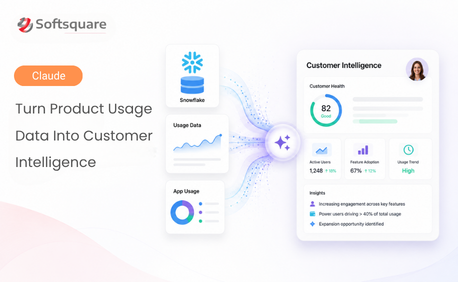
From Snowflake: active users, feature adoption, and usage trends. From Outlook: pricing concerns, renewal blockers, and follow-up commitments not yet logged in Salesforce.
Customer success teams detect renewal risk earlier, account managers prepare faster, revenue teams spot expansion signals, and product teams understand adoption without waiting for analyst reports.
Custom integrations require ongoing development and maintenance. Claude Salesforce MCP uses standardized MCP connectors and each system's existing access controls — reducing overhead significantly.
More Insights for you










Ready to Transform Your Business with Salesforce & AI?
