

Salesforce Marketing Automation: Build Campaigns That Actually Convert


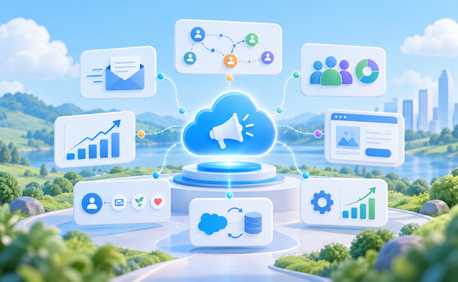
Table of Contents


Modern marketing campaigns involve much more than scheduling a few emails. Customers and prospects may interact with a business through email, websites, mobile apps, events, sales conversations, service interactions, and other channels before making a decision. Managing those interactions manually makes it difficult to deliver relevant communication at the right time.
Salesforce marketing automation helps marketing teams automate campaigns, nurture prospects, personalize communication, coordinate customer journeys, and connect marketing activity with Salesforce CRM data.
Depending on the Salesforce product being used, this can include Journey Builder, Account Engagement lead nurturing, segmentation, forms and landing pages, Einstein-powered optimization, CRM synchronization, and campaign reporting.
Marketing Cloud Engagement supports Journey Builder, segmentation, cross-channel campaigns, and Einstein optimization, while Account Engagement (Pardot) focuses on B2B lead nurturing, scoring, forms, and CRM synchronization.
The goal is not automation for its own sake. Effective marketing automation should help teams create more relevant experiences while improving the path from engagement to conversion.
What Is Salesforce Marketing Automation?
Salesforce marketing automation refers to the Salesforce products and capabilities used to automate marketing activities such as audience targeting, email campaigns, lead nurturing, customer journeys, personalization, and campaign measurement.
It is important to understand that Salesforce currently has several marketing products rather than one universal “Marketing Cloud” application.
Marketing Cloud Engagement is designed for B2C-style engagement and includes capabilities such as Journey Builder, Email Studio, Content Builder, Automation Studio, SMS, and mobile Popup Notification, Whatsapp Messaging
Marketing Cloud Account Engagement, formerly Pardot, focuses primarily on B2B marketing. It includes prospect management, lead scoring and grading, forms, landing pages, automation rules, and Engagement Studio,Website tracking,Page Actions,Complete Actions for lead nurturing.
Salesforce also offers Marketing Cloud Next, launched in Spring 2024. It works natively with Salesforce CRM and Data 360 and uses Flow Builder for visual automation. Salesforce’s current product comparison identifies Journey Builder as the visual automation tool for Marketing Cloud Engagement, Engagement Studio for Account Engagement, and Flow Builder for Marketing Cloud Next.
Which product is appropriate depends on the audience, channels, existing Salesforce environment, data architecture, and campaign requirements.
Why Marketing Automation Matters for Campaign Performance
Buyer expectations have changed. People expect communication to reflect what they have already viewed, purchased, requested, or discussed with a business.
That creates several challenges for marketing teams.
A single prospect may engage with multiple campaigns before talking to sales. A customer may move between email, web, SMS, mobile, and service interactions. At the same time, marketers need to manage consent, avoid excessive messaging, measure performance, and determine which activities are contributing to pipeline or revenue.
Manual processes struggle at this scale. Marketing automation can help teams:
- Trigger communication based on customer behavior
- Nurture prospects over longer buying cycles
- Segment audiences according to meaningful attributes
- Coordinate messages across supported channels
- Reduce repetitive campaign work
- Personalize communication at greater scale
- Route qualified prospects to sales
- Measure marketing influence on pipeline
- Automate follow-up based on real-time engagement signals
- Maintain consistent customer journeys across lifecycle stages
Automation does not automatically improve conversion. Poor segmentation or irrelevant content simply becomes automated poor marketing. The technology works best when it supports a clear customer journey and campaign strategy.
Core Salesforce Marketing Automation Features
The exact Salesforce marketing automation features available depend on the Salesforce marketing product and edition in use.
Email Studio and Journey Builder
In Marketing Cloud Engagement, Journey Builder enables marketers to create automated customer journeys using a visual canvas. Contacts enter through defined entry sources and move through activities based on the journey logic. Salesforce describes Journey Builder as a campaign planning tool that continually evaluates contacts to determine when they should progress to the next activity.
This makes it useful for campaigns such as:
- Welcome journeys
- Onboarding sequences
- Abandoned-cart reminders
- Renewal communication
- Customer re-engagement
- Event follow-up
- Lifecycle campaigns
- Lead Nurture Journey
- Cross – Sell and Upsell Campaigns
Email Studio and Content Builder support reusable content, personalization, dynamic content, and email creation. Marketing Cloud Engagement also supports A/B testing to compare elements such as emails, subject lines, content areas, sender names, and send timing.
The important step is to design the journey around customer behavior rather than creating a long sequence of messages simply because they can be automated.
Engagement Studio
In Marketing Cloud Account Engagement (Pardot), Engagement Studio helps marketers build automated lead nurturing programs using a visual canvas.
Prospects enter through recipient lists and move through the program using:
- Actions: Send emails or update prospect data
- Triggers: Respond to activities such as opens, clicks, and form submissions
- Rules: Evaluate prospect criteria and route them through different paths
It is useful for:
- Lead nurturing
- Welcome and onboarding campaigns
- Event follow-up
- Prospect re-engagement
- Upsell and cross-sell campaigns
- Sales-readiness programs
Engagement Studio can also use lead scoring and grading to help determine when a prospect is engaged, a good fit, and ready for sales follow-up. The key is to build programs around prospect behavior and buying stage, rather than simply sending a fixed sequence of emails.
Lead Scoring and Grading
For B2B marketing, Marketing Cloud Account Engagement provides scoring and grading to help marketing and sales identify prospects that may be ready for further engagement.
A prospect’s score represents behavioral interest. Activities such as email interaction, webinar participation, and form submissions, Website Page views can contribute to a numerical score.
A grade represents how closely the prospect matches the organization’s ideal customer profile. Account Engagement can evaluate criteria such as company size, industry, location, job title, and department.
This distinction matters.
A person can be highly engaged but be a poor fit for the product. Another can closely match the ideal customer profile but have shown little buying intent. Combining behavioral and demographic or firmographic signals provides a stronger basis for defining when a prospect should be handed to sales.
Audience Segmentation
Salesforce marketing tools let teams segment audiences using factors such as lifecycle stage, product interest, geography, engagement, and lead score. CRM data and suppression criteria also help ensure campaigns reach the right audience while excluding contacts who should not receive a message.
Multi-Touch Campaign Automation
Salesforce marketing automation can coordinate follow-up campaigns across email, SMS, push, and other supported channels based on customer actions. This helps teams automate nurture, re-engagement, and event-triggered journeys without managing each interaction manually.
Landing Pages and Forms
Campaign conversion often happens away from the inbox. Marketing Cloud Account Engagement includes marketing forms, and landing-page capabilities for capturing prospect information.
Hosted Account Engagement forms can support progressive profiling, allowing marketers to gather additional information over multiple interactions instead of asking the same prospect to complete a long form every time. Salesforce recommends using progressive profiling to gradually capture information during subsequent form submissions. Also, we can use a Pardot owned reCAPTCHA.
Form handlers provide another option. They allow existing third-party or custom website forms to send prospect information into Account Engagement.
This is useful when an organization already has carefully designed website forms and does not want to replace them with Salesforce-hosted forms. Landing pages and forms should remain simple. Every additional field creates another opportunity for a prospect to abandon the process.
Einstein AI for Marketing
AI can help marketers optimize campaigns using historical engagement data and behavioral patterns. In Marketing Cloud Engagement, Einstein capabilities include areas such as:
- Send Time Optimization
- Engagement Frequency
- Engagement Scoring
- Content Selection
- Email and web recommendations
- Messaging insights
For example, Einstein Send Time Optimization predicts when an individual contact is more likely to engage with a message. In Marketing Cloud Engagement, the Journey Builder activity can then send messages according to the predicted engagement time.
Einstein Engagement Frequency can help identify whether contacts are being messaged too often or too little, while Einstein Content Selection can choose personalized content based on available data and business rules.
Marketing Cloud Next is also expanding Salesforce’s generative and predictive AI capabilities, including AI-assisted campaign creation and optimization.
AI recommendations should still be monitored against campaign objectives. AI can optimize signals and patterns, but it does not replace a clear marketing strategy or accurate customer data.
CRM Integration and Lead Handoff
One of the strongest advantages of marketing automation for Salesforce is the connection between marketing activity and CRM processes. Marketing teams can capture and nurture prospects while sales teams work with Leads, Contacts, Accounts, and Opportunities in Salesforce CRM
For B2B organizations, qualification rules can determine when prospects are ready to move to sales. Routing can then use the organization’s Salesforce assignment and sales processes.
This creates an opportunity to align both teams around shared definitions:
- What makes a qualified lead?
- Which behaviors demonstrate intent?
- Which accounts should receive priority?
- When should marketing stop nurturing and sales engage?
- What happens when sales returns a prospect to marketing?
Without those definitions, even a sophisticated automation platform can create poor handoffs.
Reporting and Campaign Analytics
Marketing performance should be measured beyond email opens and clicks. Useful metrics can include:
- Click-through rate
- Conversion rate
- Form completion
- Unsubscribe rate
- Journey completion
- Marketing-qualified leads
- Sales-qualified leads
- Opportunity creation
- Pipeline influenced
- Revenue influenced
- Cost per acquisition
Salesforce CRM also provides Customizable Campaign Influence, which can connect campaigns, contacts, and opportunities and assign influence using standard or custom attribution models.
This provides a stronger link between marketing activity and business results than measuring engagement metrics in isolation.
Best Practices for High-Converting Campaigns
Marketing automation technology becomes more effective when a few fundamentals are handled well.
- Map the journey before building it. Define the desired customer path, decision points, exits, and conversion event before opening Journey Builder or Engagement Studio.
- Segment before you send. A smaller relevant audience often performs better than a large generic list.
- Test meaningful variables. Subject lines, offers, content, CTAs, timing, and audience criteria can all influence performance using A/B test. Change one meaningful variable at a time where practical, so the result is understandable.
- Align scoring with sales. Review qualification thresholds with the sales team instead of allowing marketing to define them independently.
- Personalize beyond the first name. Product interest, lifecycle stage, account context, transaction history, and engagement behavior usually provide more useful personalization than simply inserting a name.
- Monitor and iterate. Journeys should not remain unchanged indefinitely. Review conversion points, drop-off areas, and engagement trends regularly.
- Keep your data clean. Duplicate, incomplete, outdated, or incorrectly synchronized records weaken segmentation, personalization, reporting, and AI.
The strongest campaigns combine automation with continuous learning rather than treating campaign launch as the end of the process.
How Softsquare Helps Businesses Maximize Salesforce Marketing Automation
Salesforce marketing automation can involve several products, data models, channels, integrations, and sales processes. The challenge is often less about configuring an individual email and more about connecting the complete journey.
Softsquare can help businesses plan, implement, and optimize Salesforce marketing automation across areas such as:
- Marketing Cloud Engagement
- Marketing Cloud Account Engagement
- Marketing Cloud Next
- Journey and nurture design
- Audience segmentation
- CRM and marketing integration
- Lead scoring and qualification
- Forms and landing pages
- Campaign automation
- Salesforce campaign management
- Reporting and attribution
- Data 360 integration
- Einstein and AI-enabled marketing use cases
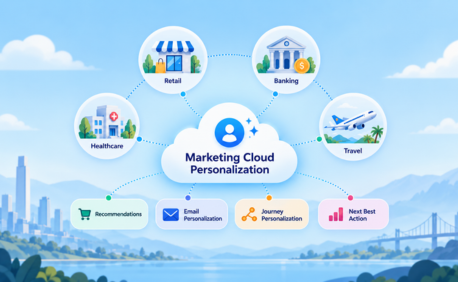
- Marketing Cloud Personalization
- Marketing Cloud and Salesforce Sync Error Solutions
The approach starts with the business objective and customer journey, then applies the Salesforce capabilities that best support that process.
This helps avoid building complex automation that looks impressive on a canvas but does not improve campaign performance.
Conclusion
Salesforce marketing automation gives businesses the tools to manage increasingly complex customer journeys without relying on manual campaign execution.
Journey Builder can orchestrate multistep customer experiences. Account Engagement can nurture and qualify B2B prospects. Einstein can optimize aspects of timing, frequency, scoring, and content. CRM integration can connect marketing engagement with sales activity and revenue outcomes.
But high-converting campaigns do not come from automation alone.
The strongest results come from combining clean data, useful segmentation, relevant content, clear qualification rules, continuous testing, and strong sales-marketing alignment.
Use Salesforce automation to make a good marketing strategy more scalable, not to automate a strategy that has not been clearly defined.
Ready to Transform with AI?
Frequently Asked Questions
Salesforce marketing automation uses Salesforce marketing products to automate activities such as email campaigns, customer journeys, lead nurturing, segmentation, personalization, qualification, and campaign measurement. The specific capabilities depend on whether an organization uses Marketing Cloud Engagement, Account Engagement, Marketing Cloud Next, or a combination of products.
Marketing Cloud Engagement is primarily designed for B2C and large-scale multichannel customer engagement using capabilities such as Journey Builder, Email Studio, SMS, and mobile messaging and WhatsApp Message. Marketing Cloud Account Engagement, formerly Pardot, focuses primarily on B2B lead generation, nurturing, scoring, grading, Website Tracking and sales alignment.
Journey Builder provides a visual canvas for creating automated campaigns in Marketing Cloud Engagement. Contacts enter from defined sources and move through activities, waits, decisions, and messaging steps according to the journey configuration.
In Account Engagement, prospect scores represent behavioral interest. Actions such as form submissions, email engagement, or webinar participation can add to a prospect’s score. Grading separately evaluates how closely the prospect matches the organization’s ideal customer profile.
Yes. Salesforce marketing products and Salesforce CRM provide APIs, connectors, Data 360 capabilities, and integration options that can be used to exchange data with external applications. The appropriate integration method depends on the specific Salesforce product and external platform.
Einstein capabilities can analyze engagement patterns to support use cases such as send-time optimization, engagement frequency, scoring, content selection, and product or content recommendations. Availability depends on the Marketing Cloud product and edition.
Track metrics that reflect both engagement and business results. These can include click-through rate, conversion rate, form completions, qualified leads, opportunity creation, influenced pipeline, acquisition cost, and revenue influence. The right metrics depend on the campaign objective.






Ready to Transform Your Business with Salesforce & AI?
